Best Big Button Cell Phones for Seniors in 2026
Consumer Cellular's IRIS Easy Flip is our top pick for big-button phones for seniors in 2026, featuring large, tactile buttons, straightforward navigation, and an affordable $59 price tag.

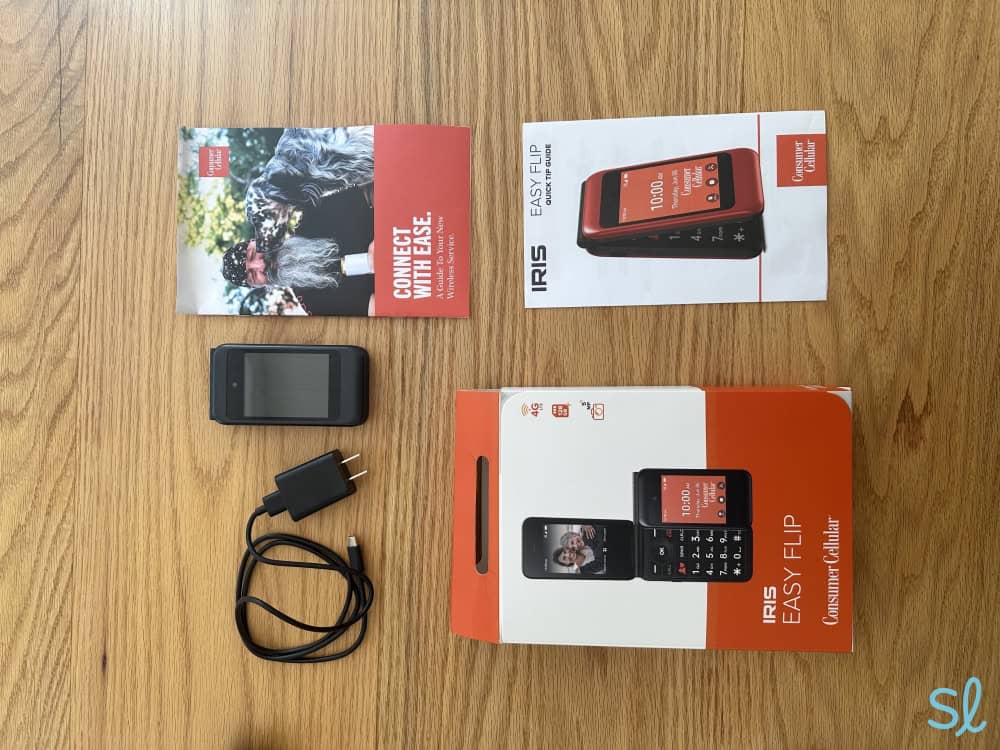
Our team orders and tests all of the phones on our list, including the IRIS Easy Flip from Consumer Cellular.
How We Tested the Phones
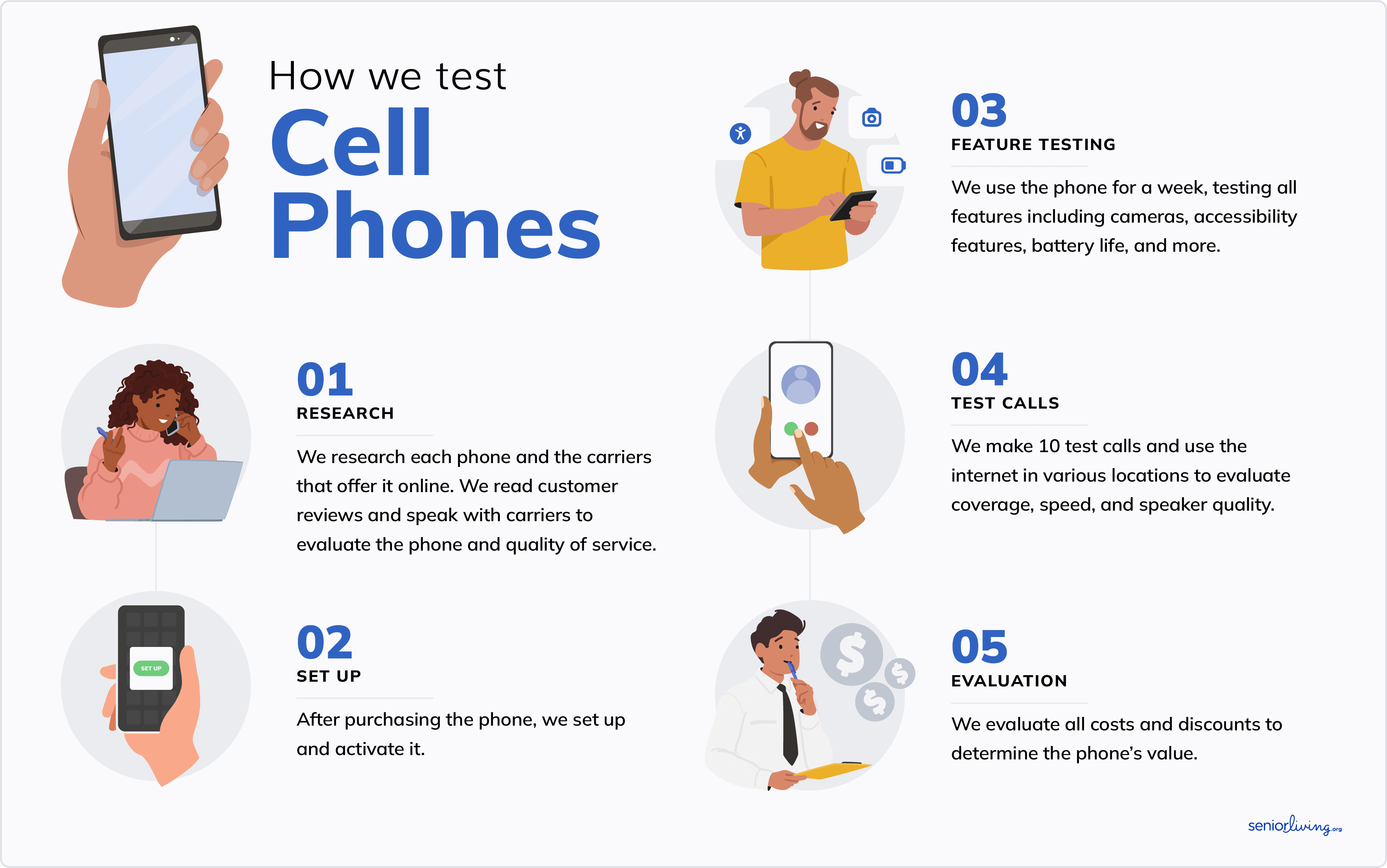
My tech team and I spent over 120 hours testing a dozen of the best cell phones for seniors. We followed the same steps for each phone:
- We researched the top phones for seniors, focusing only on those that offer large, tactile buttons. We examined websites, spoke with customer service reps, and ordered our top picks.
- After we received each phone, we spent a few days using each device to get a feel for daily use. We noted our experiences, evaluating each phone’s features, price, battery life, simplicity, service quality, and value. I also received help from my grandma whenever possible to ensure the phones on this list are certifiably senior-friendly!
- We compared notes, discussed what we liked and disliked about each model, and narrowed down our top picks to create our final list of the best big-button cell phones for seniors.
How We Chose the Best Big-Button Phones for Seniors
You’ll find that every phone on this list meets the following criteria.
- Ease of use: Our favorite big-button phones are easy to use and navigate, even for seniors who aren’t up-to-date on technology. My grandma and I ensured each phone was easy to navigate and didn’t overcomplicate matters. We also evaluated the distance between the buttons. The keys on big-button phones shouldn’t feel cramped since they can make typing and hitting the correct button more difficult.
- Price: A senior-friendly phone shouldn’t put a dent in your wallet. I’m all about a good deal, so all the phones on this list are $300 or less — and most are under $100. We also only included phones that offer a solid bang for your buck.
- Senior-friendly features: This one’s a bit of a no-brainer. All the big-button phones that made the list include senior-friendly features, such as an easy-to-grip design, large buttons, hearing aid compatibility, medical alert capabilities, and bright screens.
Why Trust Us
Our senior tech experts try the latest products for older adults. We’ve spent hundreds of hours testing and reviewing cell phones and plans for seniors. We consult with older adults to learn about their personal experiences with different phone models, including what they liked, what they disliked, and features they think could make their phones easier and more enjoyable to use.
SeniorLiving.org is supported by commissions from providers listed on our site. Read our Editorial Guidelines

- Priced at $59
- Easy-to-use design
- Unique features: Personal assistant and voice commands

- Priced at $79.99
- Easy to grip
- Unique features: Magnifier to enlarge text

- Priced at $297.99
- Simple button layout
- Unique features: Damage-resistant design

- M4/T4 hearing aid compatibility
- Up to 40 hours of talk time
- Works as a WiFi hotspot
Contents
As SeniorLiving.org’s tech expert, I understand that many popular phones aren’t designed with seniors’ needs in mind. They have small buttons without tactile sensations. Touchscreens are all the rage, but they can be challenging for older adults to use, especially for individuals with arthritis, mobility issues, or vision loss. They can also be finicky to manage, even for those without dexterity challenges.
Some companies have abandoned simple flip phones for advanced smartphones, but there are still many excellent big-button cell phones for seniors. These phones offer senior-friendly features, including tactile keys, bright screens, intuitive navigation, and compatibility with hearing aids.
Our tech team spent ample time researching and conducting hands-on testing with a dozen of the best big-button phones on the market. We chose the IRIS Easy Flip from Consumer Cellular as our top big-button cell phone for seniors, thanks to its affordable price, large and responsive buttons, and easy navigation.

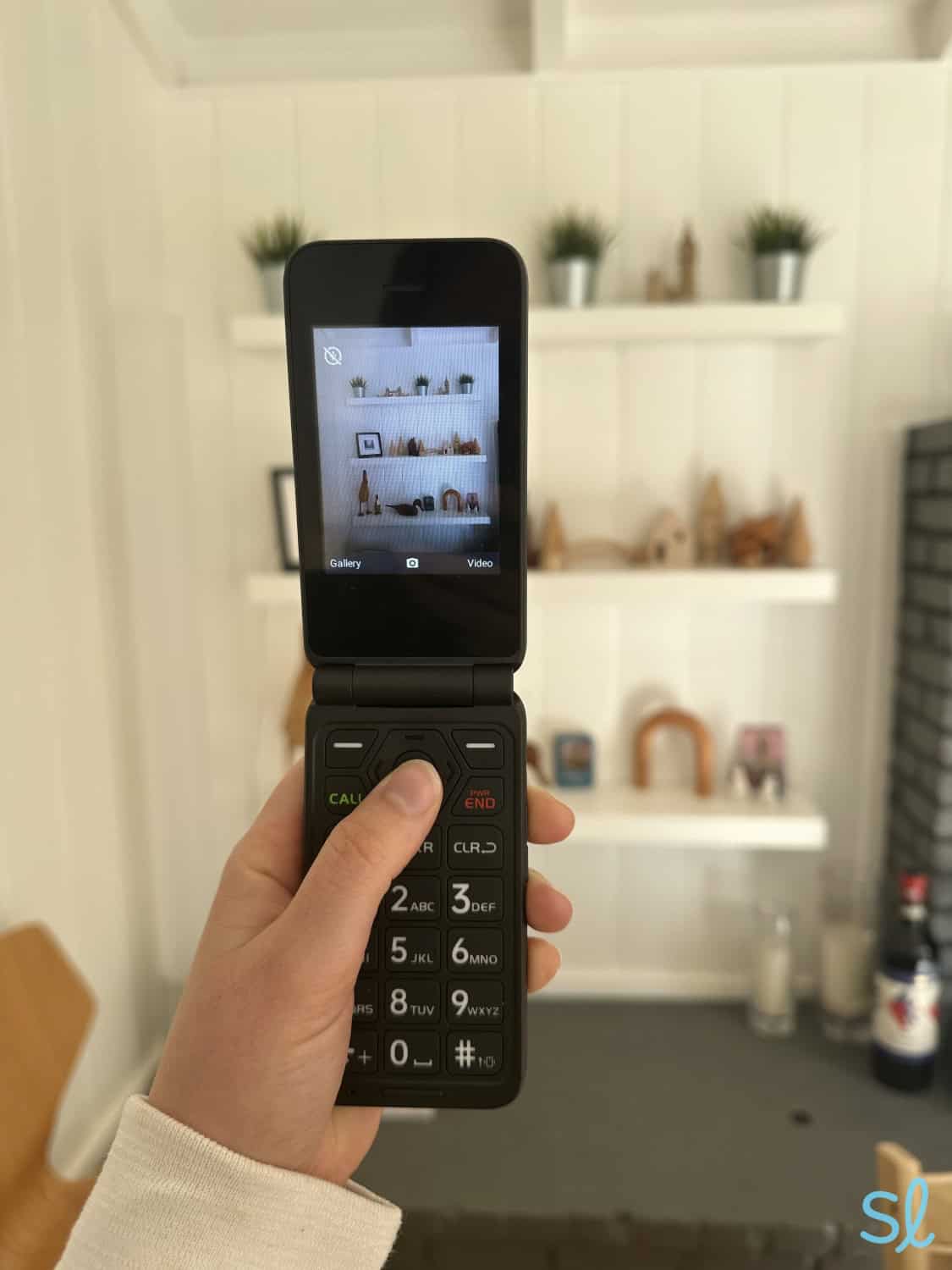
Taking a photo on Consumer Cellular's IRIS Easy Flip.
Comparing the Best Big-Button Phones for Seniors
Below is a comparison of our picks for the best big-button cell phones for seniors updated for 2026.
|
IRIS Easy Flip from Consumer Cellular
|
Jitterbug Flip2 from Lively
|
Sonim XP5plus from AT&T
|
TCL FLIP 4 5G from T-Mobile
|
|
|---|---|---|---|---|
| Rating | 4.7 | 4.5 | 4 | 4.7 |
| Price | $59 | $79.99 | $297.99 | $99.99 |
| Network | Consumer Cellular | Lively | AT&T | T-Mobile |
| Contracts | No | No | Yes | No |
| Battery life |
Standby: 19 days; Talk time: 12 hrs |
Standby: 16 days; Talk time: 14 hours |
Standby: 24 days; Talk time: 30 hrs |
Standby: Up to 15 days; Talk time: Up to 40 hrs |
| Internet speed | N/A | 4G LTE | 4G LTE | 5G |
| Mobile hotspot | No | No | Yes | Yes |
| Camera | 5 MP | 8 MP | 8 MP | 5 MP |
-
1. IRIS Easy Flip from Consumer Cellular - Most affordable
See Pricing Links to Consumercellularplan.comWhat we like most
- Priced at $59
- Easy-to-use design
- Unique features: Personal assistant and voice commands
IRIS Easy Flip from Consumer CellularSee Pricing Links to Consumercellularplan.comOverview:
Testing out the IRIS Easy Flip from Consumer Cellular
Why It’s One of Our Top Picks
Practical and affordable. Those are the two words I would use to describe the IRIS Easy Flip from Consumer Cellular. The phone gets straight to the point, and I found it simple to use. It’s also the most affordable phone on our list.
Nevertheless, it still offers key cell phone features that older adults need. The flip phone is designed with large, well-spaced, and tactile buttons that make dialing and navigation simple for older hands. The dual screens are also well-lit to assist people with vision loss.
» You Might Like: Best Cell Phones for Visually Impaired Seniors
After testing Consumer Cellular’s previous flip phone, the Verve Snap, I noticed the IRIS Easy Flip makes several small but practical improvements. The main and outer screen is substantially larger, at 2.8 inches. The IRIS Easy Flip also comes with 8 GB of internal memory, which is great for storing all your favorite photos and videos. The IRIS Easy Flip’s 5 MP camera was passable, but nothing special.
Pros & Cons:Pros About IRIS Easy Flip from Consumer Cellular
- Affordable price
- Simple design
- Bluetooth connectivity
- Free activation with Consumer Cellular
- Wi-Fi and GPS
- M4/T4 hearing-aid compatibility
- Bright display for people with vision loss
Cons About IRIS Easy Flip from Consumer Cellular
- Must use Consumer Cellular service
- Very basic camera
- Slow processing speeds with 1 GB of RAM
Our Hands-on Experience:Button Layout
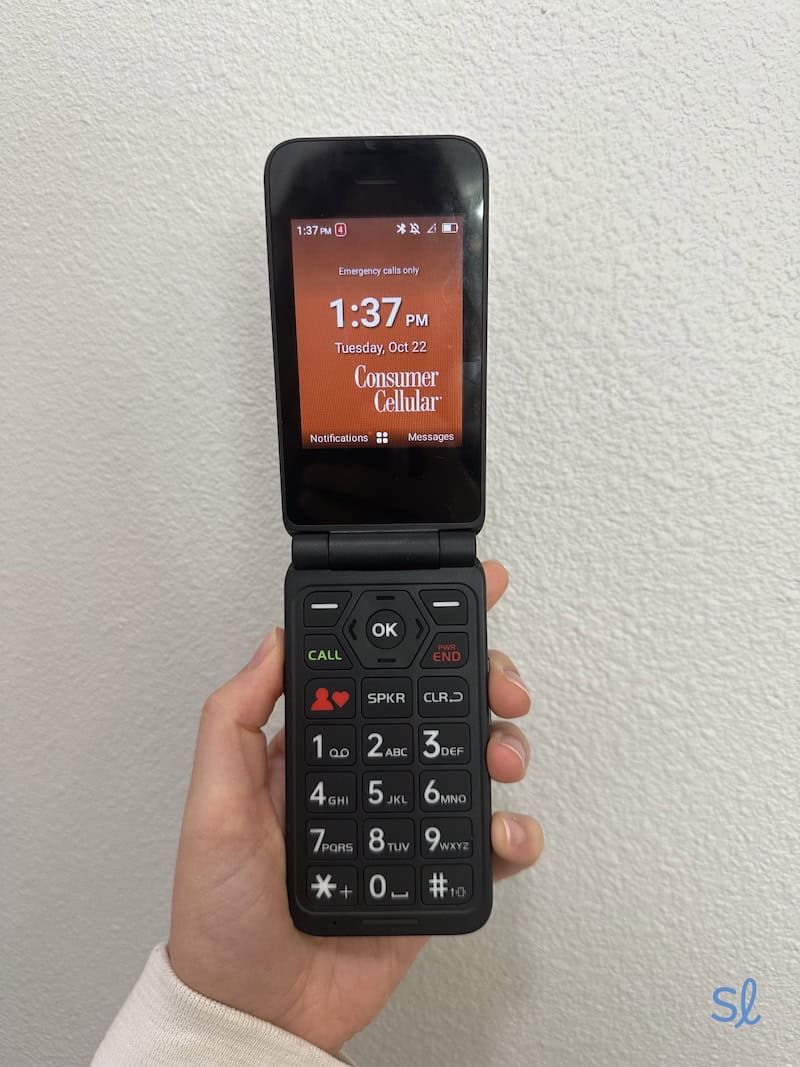
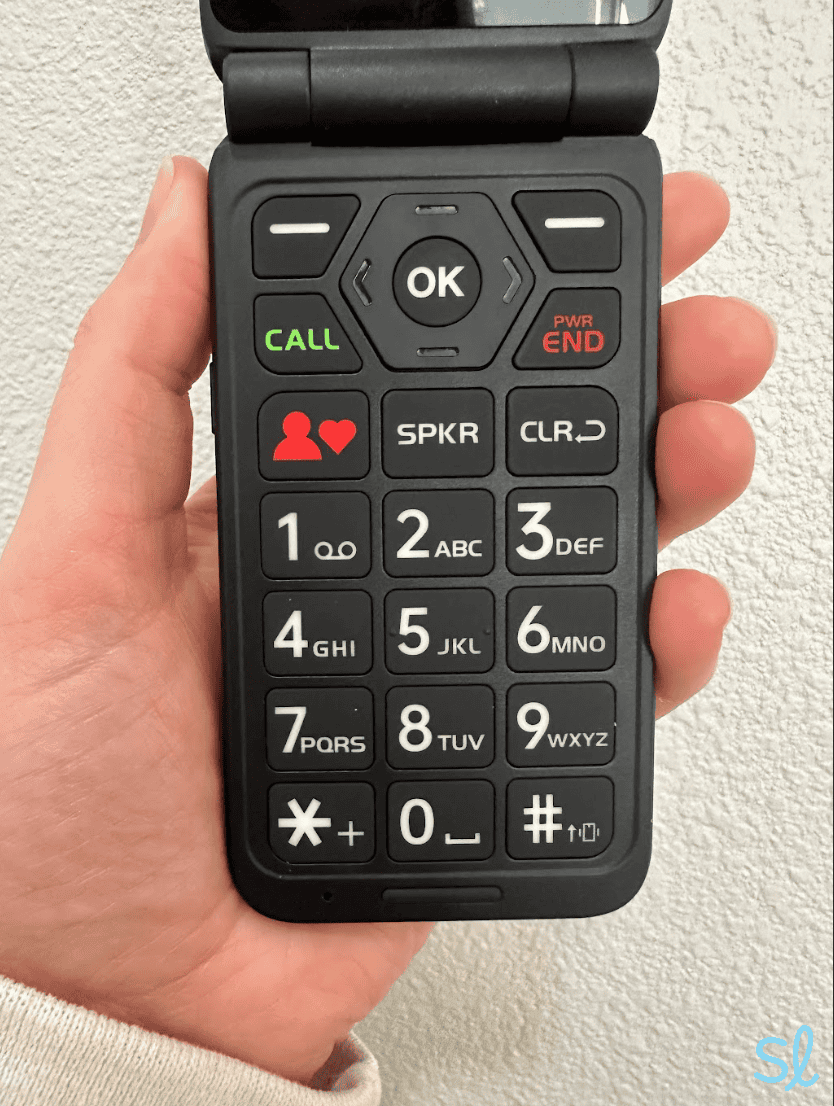
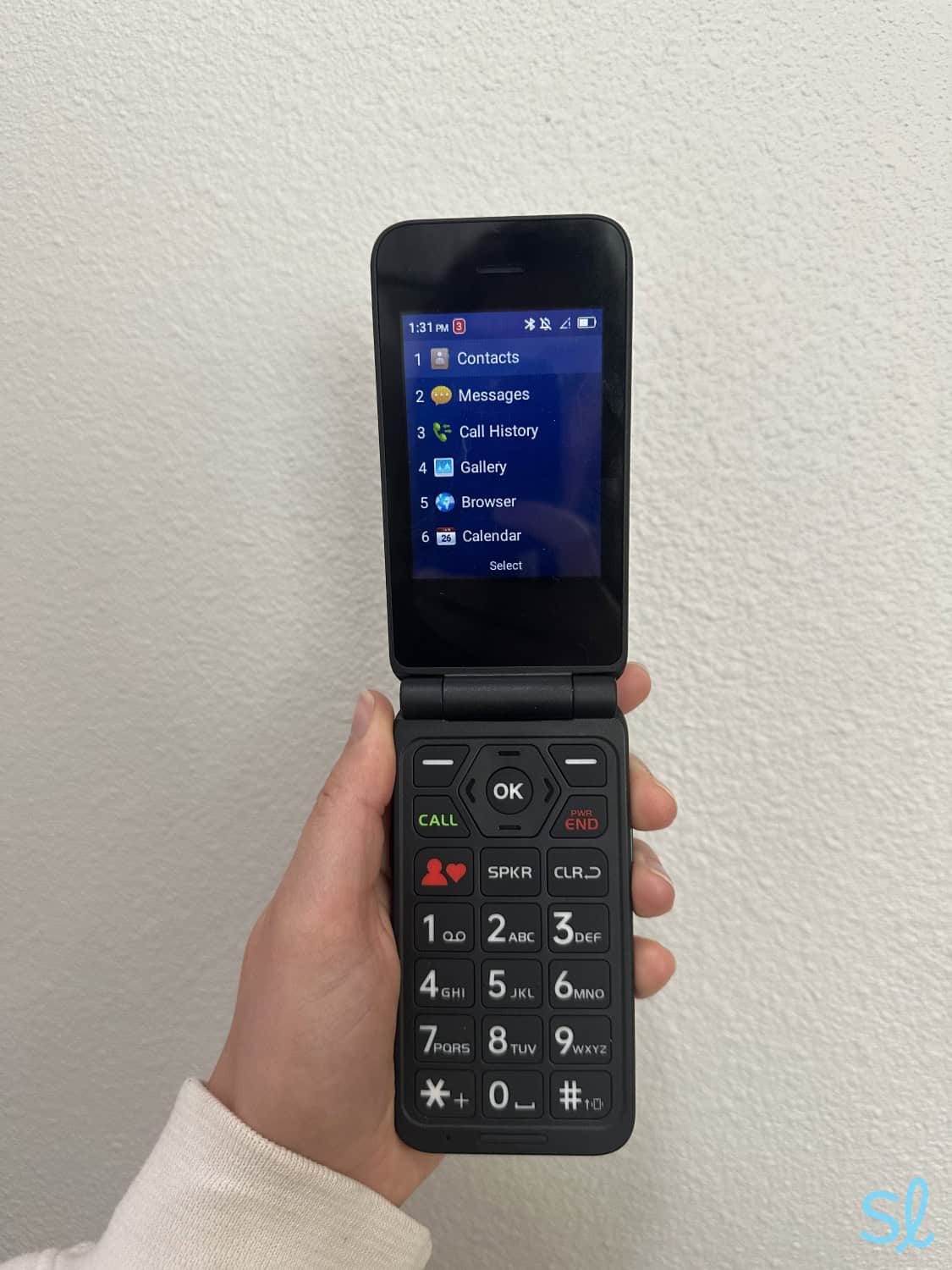
The IRIS Easy Flip features the standard 12-button number layout, the star sign (*), and the number sign (#). Each button is separated by approximately 2 millimeters, making it easy to dial a phone number without accidentally pressing two buttons simultaneously. The IRIS Easy Flip features a smart layout for dialing numbers and T9 texting, especially compared to the Sonim XP5plus, which has less space between its buttons.
» Related Reading: Best Flip Phones for Seniors
The IRIS Easy Flip also features distinctly marked buttons to start or end a call, switch to speaker mode, and delete text. There are also standard arrow buttons to navigate the menu and apps, as well as two generic keys at the top of the keypad that bring up your notifications and camera.
One feature I liked was the “Favorites” button (the red button at the bottom with a heart symbol). It allowed me to quickly access a custom list of contacts rather than manually searching through all my contacts or dialing phone numbers.

The IRIS Easy Flip has large, clearly labeled buttons, one of the most important features of a phone for seniors
Ease of Use
The IRIS Easy Flip is an excellent option for older adults who use the internet infrequently (or never). You can stay connected with friends and family through calls or texts. It is a step up in usability from its predecessor, the Verve Snap, as it offers (limited) access to the internet. The Favorites button and the built-in virtual assistant make it easy to handle all the basics on the IRIS Easy Flip, from making a call to changing the default settings.
» Learn More: Consumer Cellular Review
The keys are very responsive and easy to use, but the built-in operating system is a bit slow. It was particularly noticeable when I tested more complex features, like GPS navigation and internet browsing. The 1 GB of RAM meant I had to wait a few seconds before the phone followed through.
 Expert InsightsFrom Taylor Shuman, Senior Tech ExpertOne downside I discovered about the IRIS Easy Flip is that it doesn’t have a voice assistant like many of Consumer Cellular’s previous flip phone models. If that feature is important to you, check out Lively’s Jitterbug Flip2
Pricing
Consumer Cellular’s IRIS Easy Flip is the most affordable phone on our list. It offers the essential features in a small, 5.47-ounce design — all for $59. That’s almost $240 less than the Sonim XP5plus, and you still get a large button layout, GPS navigation, mobile apps, and more.
» Dive Deeper: Consumer Cellular Phone Plans
The one downside is that you’re locked into using Consumer Cellular as your phone carrier. That shouldn't be a major issue with reliable service and plans starting as low as $20 per month. Still, I would have liked the option to pair the IRIS Easy Flip with AT&T or other major carriers. Fortunately, Consumer Cellular offers some of the best prices for its phones and senior-friendly plans with no activation fees.
FYI: Would you like to know ahead of time exactly how much you’ll pay for phone service? Check out our guide to the best prepaid phone plans for seniors!
-
2. Jitterbug Flip2 from Lively - Best medical alert features
What we like most
- Priced at $79.99
- Easy to grip
- Unique features: Magnifier to enlarge text
Overview:
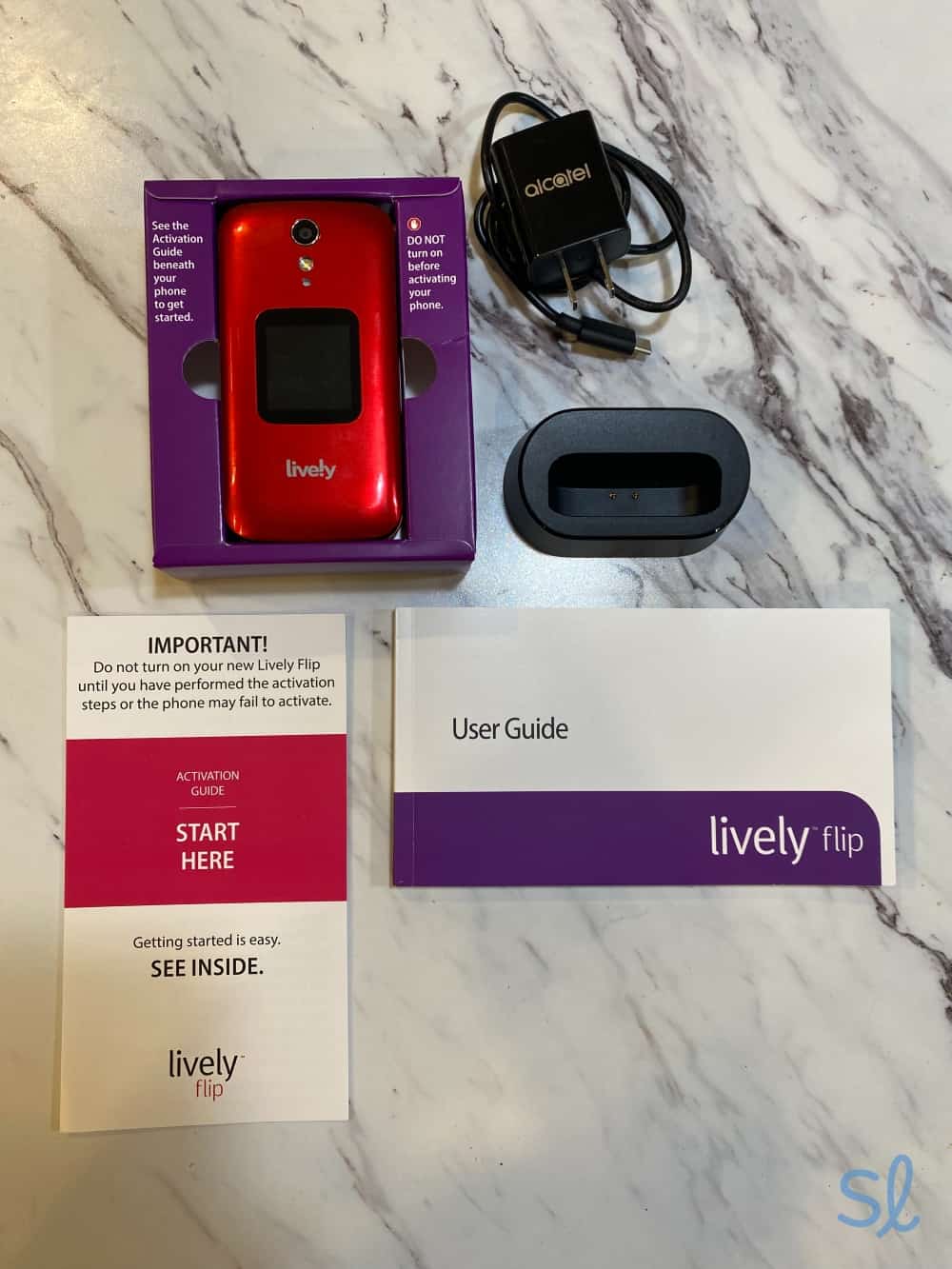
One of our writers testing out the Jitterbug Fip2
Why It’s One of Our Top Picks
Lively’s Jitterbug Flip2 features advanced medical alert features you won’t find with other big-button phones. It’s voice-activated, thanks to built-in Amazon Alexa technology, meaning I could control the phone with my voice. It’s excellent for people with arthritis or vision loss. The phone’s big buttons are backlit. I could easily see the phone in dimly lit places, and its large screen made reading texts and navigating the phone a breeze.
Expert InsightsFrom Taylor Shuman, Senior Tech ExpertLively’s Jitterbug phones are some of my favorite options for seniors, as they also offer medical alert features. This is pretty rare for a cell phone, and it helps the user stay protected discreetly without the need for a separate medical alert system.The Jitterbug Flip2 doubles as an urgent-response device when you choose a Preferred or Premium phone plan. It features a large, red button that instantly connects you to the Lively Response Team to assist in case of an emergency. That feature makes the Jitterbug Flip2 great for older adults who live alone and may be at risk of falls or other emergencies. According to the CDC, falls are a leading cause of injury for older adults, so having protections in place is essential!1
» You Might Also Like: Best Phone Plans for Seniors
Pros & Cons:Pros About Jitterbug Flip2 from Lively
- Very easy to use and grip
- Convenient list-based menu
- Long-lasting battery
- M4/T4 hearing-aid compatibility
- Magnifier to enlarge text
- 8 MP camera
- Speaker designed for older ears
- Urgent Response button
- Built-in Amazon Alexa
Cons About Jitterbug Flip2 from Lively
- Urgent Response service requires a more expensive phone plan
- No option to download apps from Google Play
Our Hands-on Experience:Button Layout
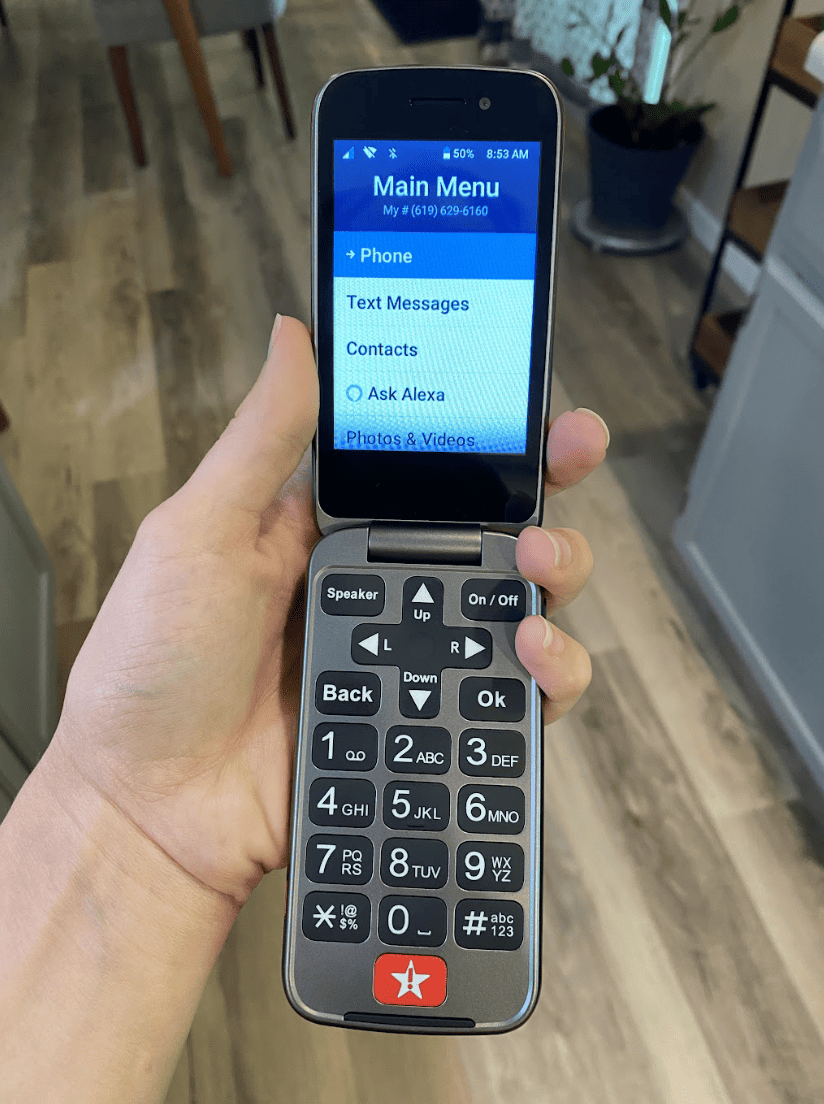
Like the IRIS Easy Flip, the Jitterbug Flip2 has ample spacing between the number keys on the keypad. My grandma and I agreed that the Jitterbug Flip2 has an even better layout since every button on the keypad is distinct and marked for its intended purpose.
Aside from the numerical keys, there’s an OK and Back button, a Speaker key to switch to speaker mode, and an On/Off power button. Even the directional arrows are labeled with Up, Down, L (left), and R (right). Where the IRIS Easy Flip has its Favorites button, the Jitterbug Flip2 has the Urgent Response button, which is bright red and marked with a star and an exclamation point.
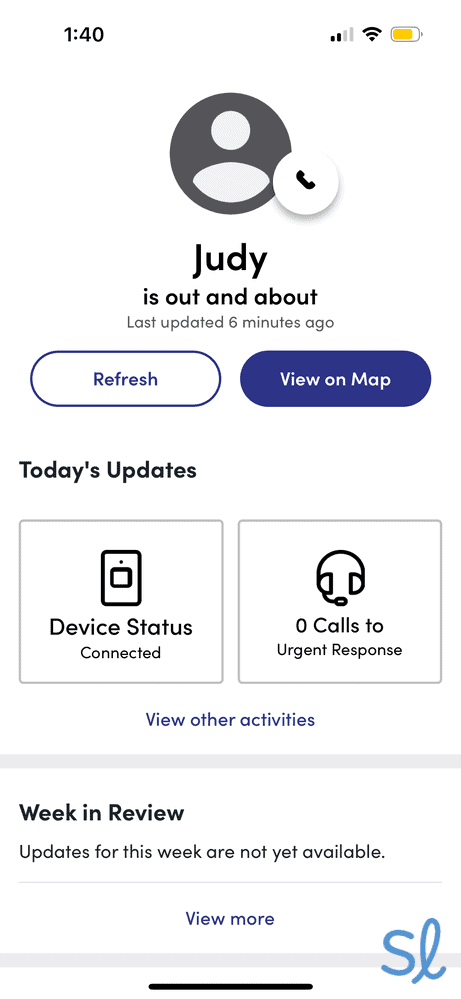
I tested the Urgent Response button and connected with an agent in around 15 seconds. The agent was patient, kind, and ready to immediately send help. I also enjoyed Lively’s other safety features, including a mobile app with caregiver tracking, on-call nurses, and a care advocate. You won’t find those features in any other phones on our list!

Testing out the Lively Link app's location tracking feature
Ease of Use
Thanks to the list-style menu and marked directional keys, navigating the Jitterbug Flip2 couldn’t be easier. My grandma picked it up and figured out how to make calls, send texts, use Amazon Alexa, and take photos instantly. The 8 MP camera isn’t stellar compared to modern smartphones, but it offers superior image quality to the TCL Flip 4 5G.
» Compare Your Options: Best Smartphones for Seniors in 2026
The only downside to the phone's simplicity is the lack of internet access. My grandma and I enjoyed using mobile apps on the IRIS Easy Flip. Those features aren't available on the Jitterbug Flip2. It's ideal for seniors who need a phone that is easy to use and can double as an emergency response device.
For a closer look at the Jitterbug Flip2, check out our latest Lively phone review.
Did You Know? According to data from the Pew Research Center, 97% of adults aged 65 and older own a cellphone!2
Pricing
At just $79.99, the Jitterbug Flip2 is Lively's most affordable phone. Unlike the Sonim XP5plus or TCL Flip 4 5G, which work with various mobile phone carriers, the Jitterbug Flip2 requires purchasing a Lively phone plan.
Lively plans start at $20 monthly for unlimited talk and text. Customers will need to upgrade to a higher-tier package if they want to include the Preferred or Premium health and safety features, which can cost up to $34.99, plus an additional $9.99 for added fall detection per month. Although nearly $50 per month may feel pricey for a basic phone plan without data, remember that your phone doubles as a medical alert device.
» Related Reading: Lively Phone Plans
-
3. Sonim XP5plus from AT&T - Most durable big-button phone
What we like most
- Priced at $297.99
- Simple button layout
- Unique features: Damage-resistant design
Overview:
Sonim XP5plus
Why It’s One of Our Top Picks
With extended battery life, brick-like design, large display, and first-responder support capabilities, the XP5plus is an excellent choice for seniors who want a phone designed with older adults in mind. What sets the XP5plus apart is its rugged design. It’s built to withstand drops and spills. I also noticed that the phone was simple to grip.
The Sonim XP5plus also comes with an impressive three-year warranty. Jitterbug phones, for comparison, have a one-year warranty. The phone also features 16 GB of built-in memory, easy-to-read buttons, noise cancellation, voice-command functionality, and optional knobs for push-to-talk channel selection and adjustable volume. The Sonim XP5plus is M3/T4 compatible, which means it will work with most hearing aids. The Sonim XP5plus even has wireless emergency alert (WEA) capabilities to help seniors feel safe on the go.
» For Couples: Best 2-Line Cell Phone Plans for Seniors
Pros & Cons:Pros About Sonim XP5plus from AT&T
- Extra navigational buttons
- Optional knobs for push-to-talk and volume control
- Damage-resistant design
- Bluetooth compatible
- Push-to-talk side button
- Wireless emergency alert (CMAS)
- Long battery life
- Loud speakers
- M3/T4 hearing-aid compatibility
Cons About Sonim XP5plus from AT&T
- Screen is a little small
- Higher cost than most flip phones
- Navigation system takes some getting used to
Our Hands-on Experience:Button Layout
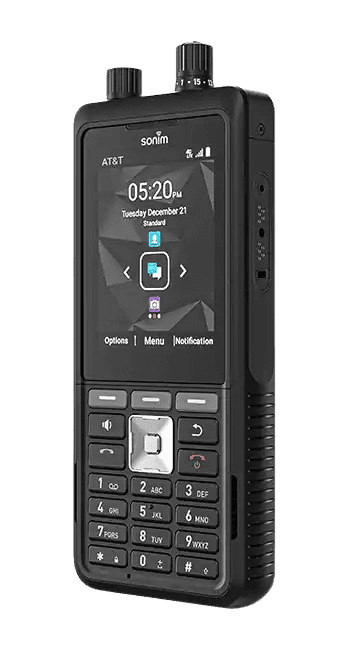
The Sonim XP5plus is unique because it has more buttons and knobs (in more places) than the other phones on this list. The first thing I noticed was the large, yellow button on the side. It serves as a push-to-talk button, functioning like a walkie-talkie. The phone also has volume buttons on the same side (plus a volume knob on top, unless you select the knobless version).
What’s most interesting, though, are the buttons on the front of the XP5plus. Three buttons just below the front screen allow you to pick the Options, Menu, or Notifications screens. The brick-style Sonim XP5plus has a standard keypad. It has all the numerical keys you would expect, four directional arrow keys, a center “select” key, a Start Call key, and an End Call key. Like the IRIS Easy Flip and Jitterbug Flip2, the Sonim XP5plus has a speaker button to switch to speaker mode and a back button to return to a previous screen or delete text.
Since the Sonim XP5plus offers internet access and mobile apps, it has three additional keys at the top that can be used to navigate more complex screens. I discovered the keys made it easier to use everything you would expect with a phone running Android 11.
It also means there are more buttons and less space for each button than on many of my favorite phones with big buttons. I had to be more precise when pressing buttons because I often accidentally pressed two numbers simultaneously when texting. The buttons are still a decent size and clearly labeled.
Ease of Use
Thanks to the Android 11 operating system and 2 GB of internal RAM, the Sonim XP5plus runs well for a brick phone. When you click a button, the phone responds immediately. You can switch between screens without delays.
That said, the navigation system took some getting used to since it felt like a basic smartphone without a touchscreen. Browsing the internet was quick but not necessarily easy. Using the navigation keys in place of a mouse or touchscreen takes some practice. If you’re not patient enough to learn the Sonim XP5plus’ navigation system, you may find yourself feeling a little frustrated.
Pricing
The Sonim XP5plus retails for $297.99, making it the most expensive phone on this list by far. It costs about three to four times as much as the Jitterbug Flip2 and TCL Flip 4 5G.
The XP5plus is hundreds of dollars cheaper than a smartphone, so the price tag is fairly manageable. Unlike the Jitterbug Flip2 and IRIS Easy Flip, the Sonim XP5plus is available through various providers, such as AT&T. Plan prices vary by carrier. You could reduce up-front costs by trading in an old phone or financing your purchase with zero-interest monthly payments.
Like many non-smart phones, the Sonim XP5plus offers only 4G speeds. As a longtime AT&T customer, I can attest to the company’s reliable 4G coverage. I had no problems with service or call quality when testing the XP5plus, whether I was at home, running errands, or traveling.
» Also Check Out: AT&T Cell Phone Plans for Seniors
-
4. TCL FLIP 4 5G from T-Mobile - Best big-button phone with internet

What we like most
- M4/T4 hearing aid compatibility
- Up to 40 hours of talk time
- Works as a WiFi hotspot
Overview:
TCL FLIP 4 5G
Why It’s One of Our Top Picks
The TCL Flip 4 5G from T-Mobile includes the essential internet features seniors look for without the added fuss of a smartphone. It’s a solid choice for older adults who want internet access and enjoy smartphone features but prefer physical keys over a touchscreen. The device has large tactile keys, making using the phone very easy for older hands.
I also appreciate the bright and clear internal and external display screens that make it easy to read texts and emails. With the 5G service, seniors can browse the web, watch videos, listen to music, and connect with friends and family through video call apps. The phone also doubles as a hotspot, providing data to other devices. I used it while working from a coffee shop and had no issues connecting to the internet.
» You Might Like: Best Internet Service for Seniors
Pros & Cons:Pros About TCL FLIP 4 5G from T-Mobile
- Simple and user-friendly interface
- M4/T4 hearing-aid compatibility
- Clear and vibrant display screen
- Android 11 operating system
- 2 GB of RAM
- 32 GB of internal storage
- Bluetooth ready
- Wi-Fi connectivity
- Long battery life
Cons About TCL FLIP 4 5G from T-Mobile
- Low-quality camera
- Limited app support
Our Hands-on Experience:Button Layout
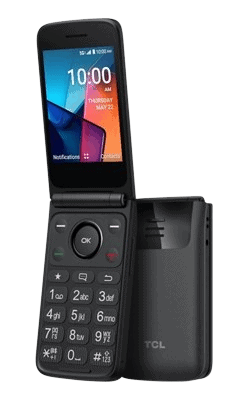
If you’ve used a flip phone before, the button layout on the TCL Flip 4 5G will look very familiar. You have 12 large numerical buttons for dialing phone numbers and T9 texting, as well as a green “Start Call” button and a red “End Call” button. Four directional keys surround the OK button. The downside is that they are not distinctly marked. I could only navigate the phone using those buttons, but they lack any symbols to indicate their existence.
The two buttons at the top help you go back or forward through screens. They also allow you to pull up settings and other menus. There are three additional buttons above the numerical keys: one to see your favorite contacts, one to view text messages, and one to delete text or return to the previous screen. I like that the TCL Flip 4 5G keeps its buttons to a minimum for ease of use, but I wish the directional keys were labeled more clearly.
Ease of Use
The bright screen and Android-based operating system make the TCL Flip 4 5G easy to use. My grandma had no trouble going from music and apps to text messages and contacts. Everything flows smoothly. But, once again, if you don’t already know the directional keys are there, you may be a little confused about how to navigate menus. Once my grandma got the hang of it, she had no issues.
Like the Sonim XP5plus, the TCL Flip 4 5G has 2 GB of RAM. That means you can expect fast speeds for a flip phone. I could quickly flip between screens and applications. There were some delays, however, when using the internet browser. I had to wait over a minute for Google Maps to open through the built-in browser. It won’t be an issue if you’re more patient than I am, but it’s something to remember.
Inside Tip: Are you struggling with vision loss? Check out our guide to smartphone apps and resources for seniors with vision impairment.
Pricing
The TCL Flip 4 5G is just $99.99. I recommend pairing the TCL Flip 4 5G with T-Mobile since the flip phone is compatible with T-Mobile's Unlimited 55+ plans. The plans offer several perks, including in-flight Wi-Fi, hotspot data, and global service. Plans start at $50 per month for one line, which is reasonable compared to other major carriers. Plus, T-Mobile's 55-and-over plans are available nationwide. Some providers, such as Verizon, offer their senior phone plans only in Florida, which is very limiting for seniors.
» Learn About: 2026 T-Mobile Review
You can finance the TCL Flip 4 5G through T-Mobile for as little as $4.13 per month with no interest. If you have an old phone to trade in, you could lower the purchase price even more!
Why Big Buttons Make a Big Difference
If you’ve ever used a BlackBerry, you know how difficult small buttons can be. Smartphones have solved that issue, but not all seniors crave a smartphone. Sometimes, you just want a simple flip phone with tactile keys to make calls, send texts, and take pictures. Even if you want more advanced features in a simpler package, big keys are crucial for many older adults.
Navigating Consumer Cellular s flip phone, the IRIS Easy Flip.
Not only do big buttons make it easier to see what you’re pressing, but they also make learning how to use the phone easier. Fewer keys mean you won’t have to spend time searching for the right button or accidentally pressing the wrong key because they’re too close together.
Those may not be major issues for some people, but many older adults want a simpler device that makes it easy to manage basic tasks. In short, big buttons can make phones easy to use, even if you’re all thumbs like me!
Did You Know?Poor grip strength is a common problem for many seniors, and studies suggest that grip strength can weaken with age, impacting daily activities.3
More Cell Phone Resources for Seniors
If you’re looking for a certain type of cell phone or just want to compare all the options, check out our resources below. We’ve tested, compared, and ranked cell phones for many different needs.
- Best Free Phones for Seniors
- Best iPhones for Seniors
- Best Cell Phones for Seniors With Hearing Loss
- Best Cell Phones for Seniors With Dementia
- Best Android Phones for Seniors
- Best Cheap Cell Phones for Seniors
- Best Samsung Phones for Seniors
- Best Voice-Activated Cell Phones for Seniors
- Best Unlocked Phones for Seniors
- Best VoIP Phones for Seniors
- Best 5G Phones for Seniors
Frequently Asked Questions About Cell Phones for Seniors
-
Are big-button phones compatible with hearing aids?
Yes, each large-button cell phone on our list is hearing aid compatible.
-
Are there senior discounts for big-button cell phones?
Both T-Mobile and AT&T provide discounted plans for seniors. Other companies, such as Lively and Consumer Cellular, craft phone plans for older adults.
-
Do you need a cell phone plan to use these phones?
Yes, each phone is provided by one or more network carriers. There are multiple plans with different talk, text, and data options.
-
Are flip phones durable?
Flip-style phones are some of the most durable phones. The internal screen is often protected from scratches and cracks resulting from drops. The devices are typically encased in strong plastic that can withstand impacts with minimal damage.
-
CDC. (2024). Facts About Falls.
-
Pew Research Center. (2024). Mobile Fact Sheet.
-
National Library of Medicine. (2015). Age and Grip Strength Predict Hand Dexterity in Adults.