The Best Cell Phones for Seniors With Dementia, Tested and Reviewed by Tech Experts in 2026
Our tech experts picked the top cell phones for those with dementia in 2026, with key benefits like easy-to-navigate menus and security features at affordable prices.

Our senior tech experts tested and compared the best cell phones on the market and narrowed down the list to our recommendations for those with dementia.
- 1,000 hours of research
- 18 products tested
- Four experts consulted
- Six products selected
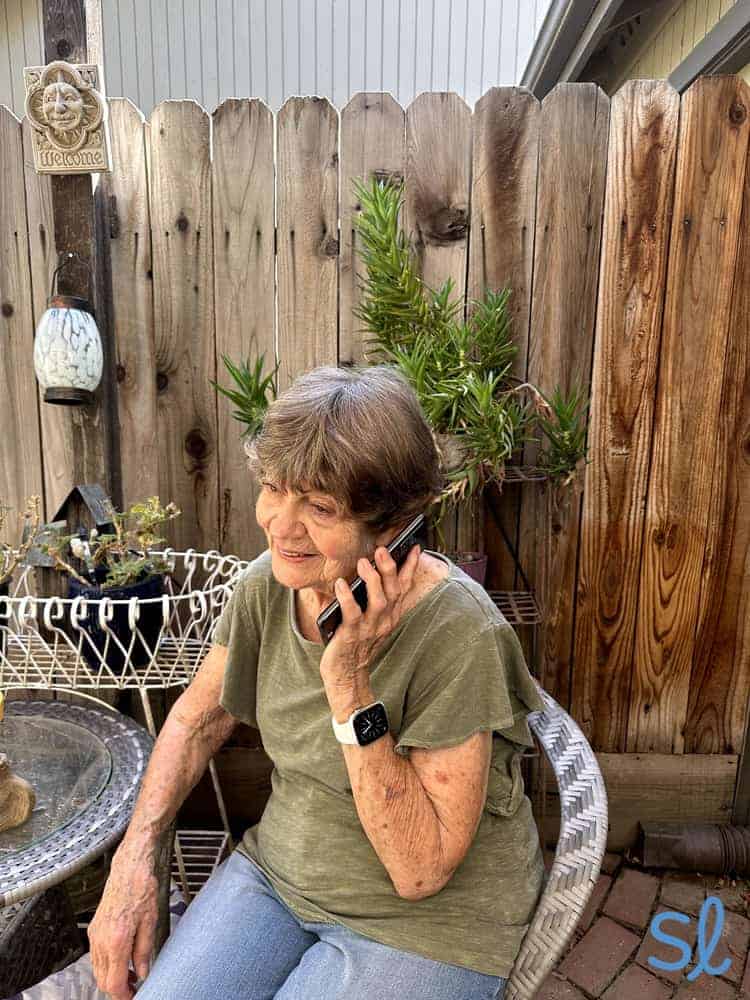
Making a call on the Jitterbug Smart4
How We Tested the Phones
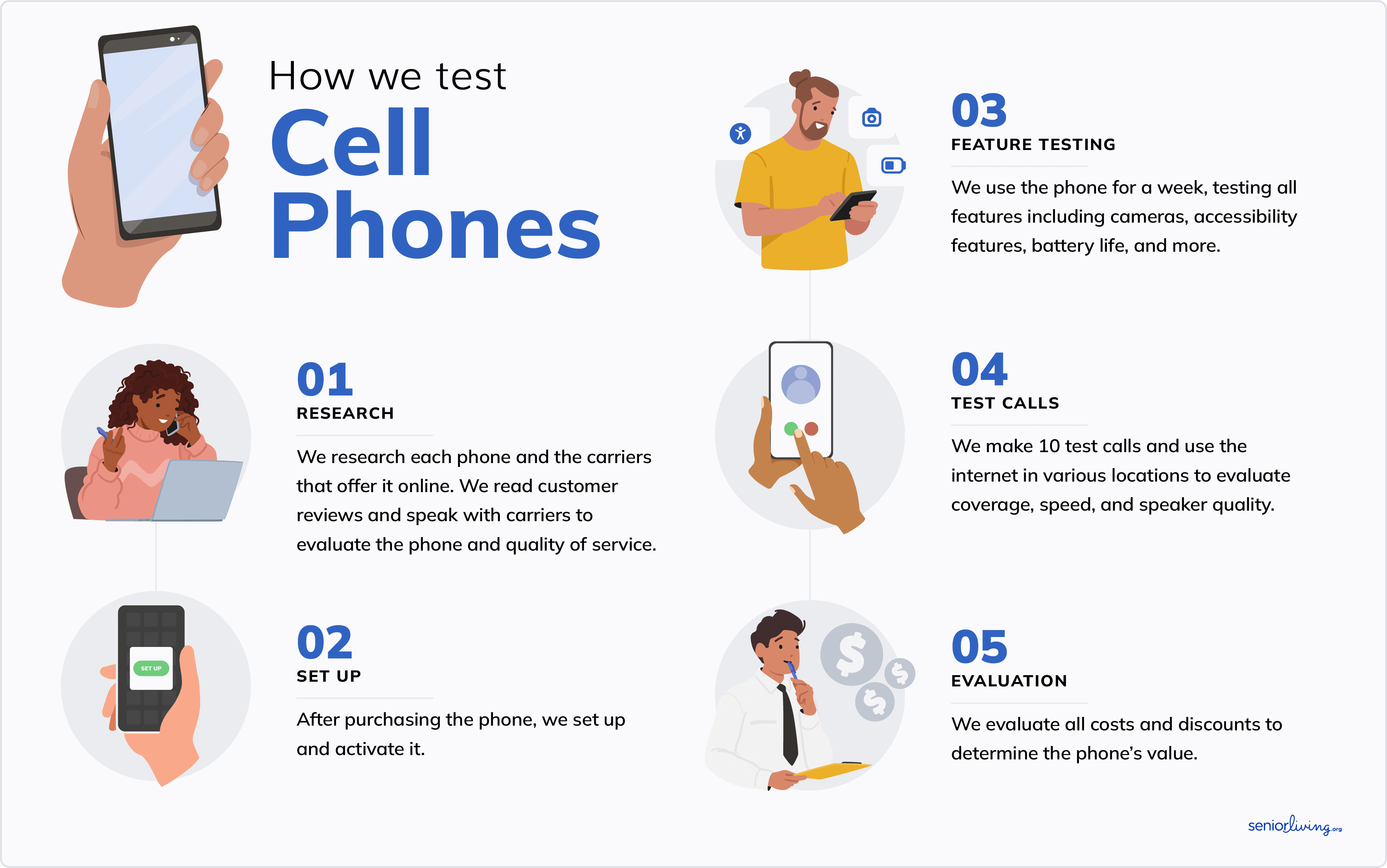
Our tech team and I identified the top phones for seniors with dementia based on the criteria below. Then we tested each phone to narrow down the list to the best phones. To ensure a thorough testing process, we tried each phone using these steps:
- We researched each of the phones and their compatible cell phone plans. Then we chatted with customer service and purchased each device.
- Once we received each phone, we unboxed it and set it up.
- We used each phone for a few days, taking notes on things we liked and didn’t like. We evaluated each phone’s quality, useful features for those with dementia, battery life, camera quality, service reliability, durability, value, and more. I also asked my grandma for feedback. She doesn’t have memory loss, but this gave us a more well-rounded picture of how useful each phone was for older adults in general.
- We compared our experience with all the phones and narrowed down our list to the devices that were the best fit for seniors with dementia.
How We Chose the Best Phones for Seniors With Dementia
The cell phones that made our list met specific criteria selected by our tech team after 1,000 hours of research and hands-on testing. To make the cut, each cell phone had to meet the following requirements:
- Useful features: The phones on this list are not only senior-friendly, but also useful specifically for seniors with dementia, with features such as easy-to-navigate menus, voice assistants, medical alert capabilities, and long battery life. We also looked specifically at camera quality, because photos can be a great way to help seniors remember important information or special moments.
- No contracts: If you’ve been a SeniorLiving.org reader for even a short time, you probably know we’re not fans of long-term contracts. All the phones on our list have month-to-month payment options, so you can cancel at any time for any reason without facing fines.
- Bang for your buck: Every senior has a different budget, so we’ve included both inexpensive and pricier options. Whatever the price point, you can rest assured that each of the phones we recommend offers solid value.
Why Trust Us?
Our senior tech experts try the latest tech for older adults. We’ve spent hundreds of hours testing and reviewing cell phones and plans for seniors. We consult with older adults to learn about their experiences with different phone models, including what they like, what they dislike, and features they think could make the phone even more helpful for seniors with memory loss.
Dementia affects cognitive abilities, making it harder to stay connected to a support network. That’s why the right cell phone is a must for both safety and communication. Our tech experts spent over 1,000 hours researching and testing the best phones for those with dementia to put this guide together.
Lively’s Jitterbug Smart4 is our top pick for those with dementia thanks to its large screen, easy-to-navigate menu, caregiver mobile app, and built-in medical alert features. It’s also budget friendly, which is a big plus.
SeniorLiving.org is supported by commissions from providers listed on our site. Read our Editorial Guidelines

- Smartphone designed for seniors
- Large buttons and list-style menu
- Unique features: Built-in medical alert features
- Flip phone designed for seniors
- Built-in medical alert features
- Large buttons and list-style menu

- Smartphone designed for those with dementia
- Built-in emergency button
- Large buttons and contact photos

- Inexpensive flip phone
- Simple design
- Internet access

- Medical alert features
- Affordable phone
- Simple design
Contents
Dementia affects cognitive abilities, making it harder to stay connected to a support network. That's why the right cell phone is a must for both safety and communication. Our tech experts spent 100 hours researching and testing the best phones for those with dementia to put this guide together.
Lively's Jitterbug Smart4 is our top pick for those with dementia thanks to its large screen, easy-to-navigate menu, caregiver mobile app, and built-in medical alert features.
Making a call on the Jitterbug Smart4

The Best Cell Phones for Seniors With Dementia
-
1. Jitterbug Smart4 from Lively - Best Smartphone
What we like most
- Smartphone designed for seniors
- Large buttons and list-style menu
- Unique features: Built-in medical alert features
Overview:
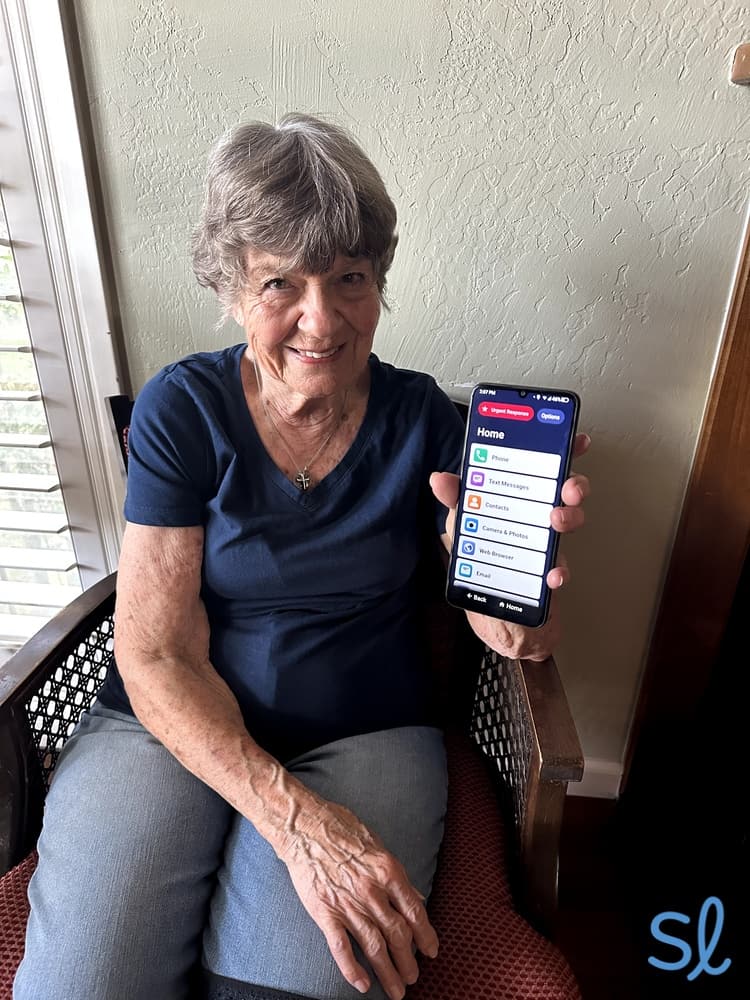
My grandma trying out the Jitterbug Smart4
Lively's Jitterbug Smart4 is one of our top cell phones for seniors and those with dementia. This isn’t the first time; When we reviewed the Jitterbug Smart4, we found it was a great pick for seniors with dementia. The Jitterbug Smart4 retails for $119.99, though Lively frequently offers discounts on their website, and you can sometimes find deals at third-party retailers like Best Buy. Even at full price, it's more affordable than many mainstream smartphones, but the Smart4 has features specifically designed for seniors to justify the cost.
The Jitterbug Smart4 is one of the easiest phones I've used, with essential smartphone features like internet access, voice typing for easy texting, and a simple list-based menu.
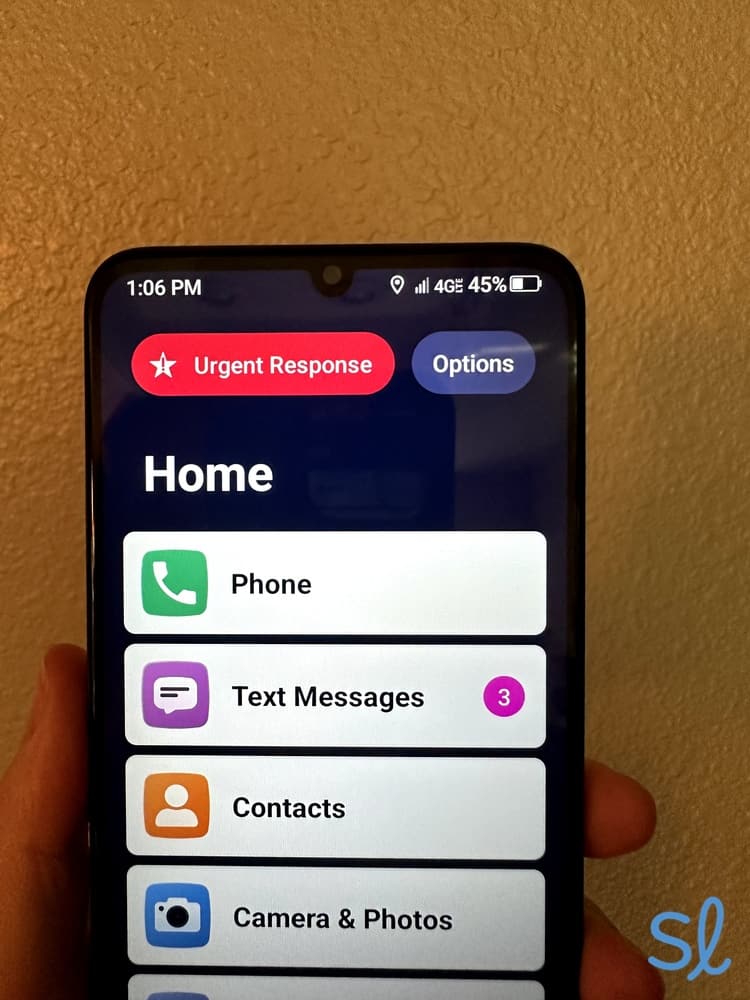
One of my favorite things about the Smart4 for those with dementia is the medical alert features. The smartphone has a large Urgent Response button. This capability is vital because research shows that older adults with cognitive impairment are significantly more likely to experience falls. After a fall or other emergency, users just press the Urgent Response button to connect with Lively's 24/7 call center.
 Expert InsightsFrom Taylor Shuman, Senior Tech ExpertMedical alert features are rare in cell phones. You can call 911 on any cell phone, but medical alert features offer added protection. Response agents already have all of your information and can send you help with the press of one button. Plus, caregiver features let loved ones track you and receive alerts during an emergency in real time.
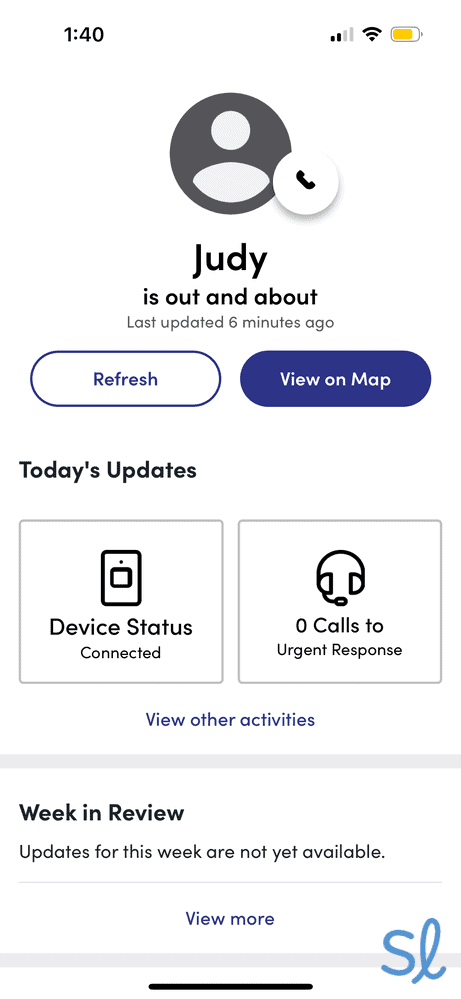
The Jitterbug Smart4 also has a companion mobile app that allows loved ones to track the user and receive notifications when Urgent Response calls are placed. This is excellent for those with dementia who are prone to wandering.
The Jitterbug Smart4 runs on Lively's network, which offers unlimited talk and text starting at $19.99 per month plus taxes and fees.
Pros & Cons:Pros About Jitterbug Smart4 from Lively
- Easy-to-use, list-style menu
- Tons of health and safety features
- Internet-ready
- Extra big screen
- Voice texting
- Urgent Response button
- Real-time call captioning
- “Hey Google” voice assistant
- Speed dialing
Cons About Jitterbug Smart4 from Lively
- Medical perks cost extra
- Slower speeds
- Service may not be available in remote or rural areas.
Our Hands-on Experience:Health and Safety Features
The Jitterbug Smart4 excels in health and safety (if you're willing to pay for it). I'm a big fan of Lively's features that allow the Smart4 to double as a medical alert system. Lively's phone plans offer a variety of health and safety features.
The Smart4's big, red Urgent Response button gives users instant access to Lively's certified medical response agents 24/7. I pressed the red button and an agent answered in 15 seconds.
Lively's Urgent Response button is clearly displayed on the home and lock screen
You won't get all the safety features with Lively's Basic Plan. If health and safety are your main reasons for considering the Smart4, upgrade to the Preferred or Premium plan. The Preferred plan gives you access to 24/7 Urgent Response agents and the Lively Link app. The app lets loved ones track the user and receive immediate notifications during emergencies.

Testing out the Lively Link app's location tracking feature
The Premium plan includes both features, plus Nurse on Call Medical Advice and Care Advocate Well-Being Support features. These add-ons are excellent for seniors with dementia who need multiple ways to receive help if they get lost, feel confused, or forget when to take medication.
Battery Life
According to Lively, the Jitterbug Smart4 battery can last for up to 37 hours of talk time. When my grandma and I tested it, we found this to be pretty accurate. In standby mode, the battery can last up to 17 days. This is great for older adults who may forget to plug in their phone at night.
Camera Quality
The Jitterbug Smart4's front-facing camera is 8 MP, while the rear-facing camera is 13 MP. You can expect clear photos and videos with either camera. The photos won’t be as high quality as, say, the latest iPhone, but they’re still decent. My grandma and I took multiple photos and videos in high- and low-light environments. We found the image quality better than the photos we took with the Jitterbug Flip2.
-
2. Jitterbug Flip2 from Lively - Best Flip Phone
What we like most
- Flip phone designed for seniors
- Built-in medical alert features
- Large buttons and list-style menu
Overview:
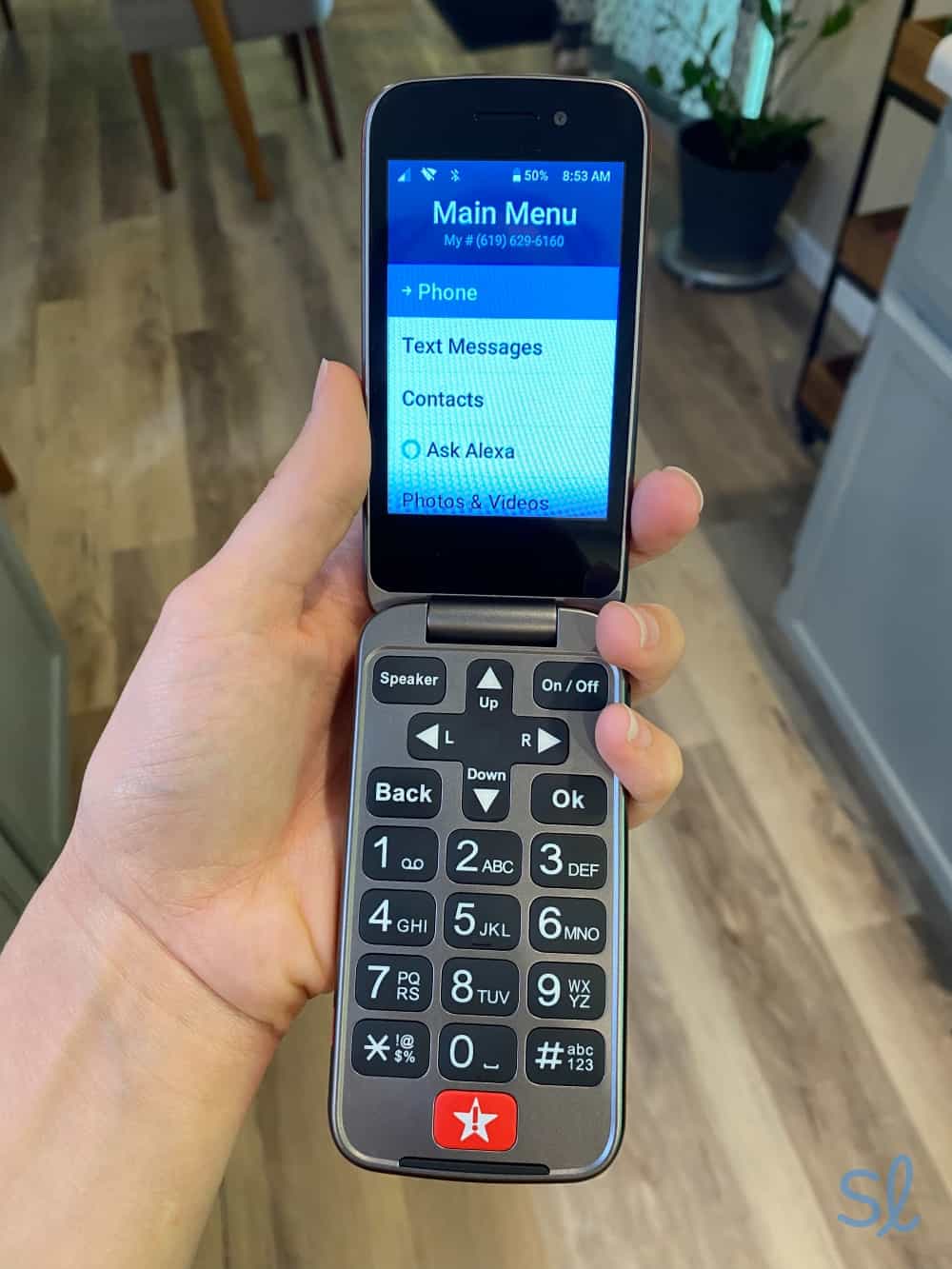
Navigating the Jitterbug Flip2
The Jitterbug Flip2 is our favorite flip phone for seniors with dementia. If your loved one is used to a flip design and doesn't want anything advanced, the Flip2 is a great choice. It also has all the medical alert features as the Smart4.
For older adults who don't like typing, Amazon Alexa is built into the phone. I used the voice assistant to navigate the Flip2's settings, ask about battery life, send texts, and make calls.
The Flip2 is a better fit for seniors who may feel overwhelmed by a smartphone. It offers the same easy, list-style menu as the Smart4, but it uses tactile buttons for navigation. The Jitterbug Flip2 costs $79.99, making it one of the most affordable phones on this list.
» Learn More: Jitterbug Flip2 Review
Pros & Cons:Pros About Jitterbug Flip2 from Lively
- Built-in Amazon Alexa
- Urgent Response button
- Easy-to-use, list-style menu
- One-touch speed dial
- Big buttons and wide screen
- Senior-friendly speakers
- Built-in magnifier and flashlight
Cons About Jitterbug Flip2 from Lively
- Urgent Response, Family Alerts, Care Advocate, and Nurse On Call are only available with higher-tier monthly plans
- No internet
Our Hands-on Experience:Health and Safety Features
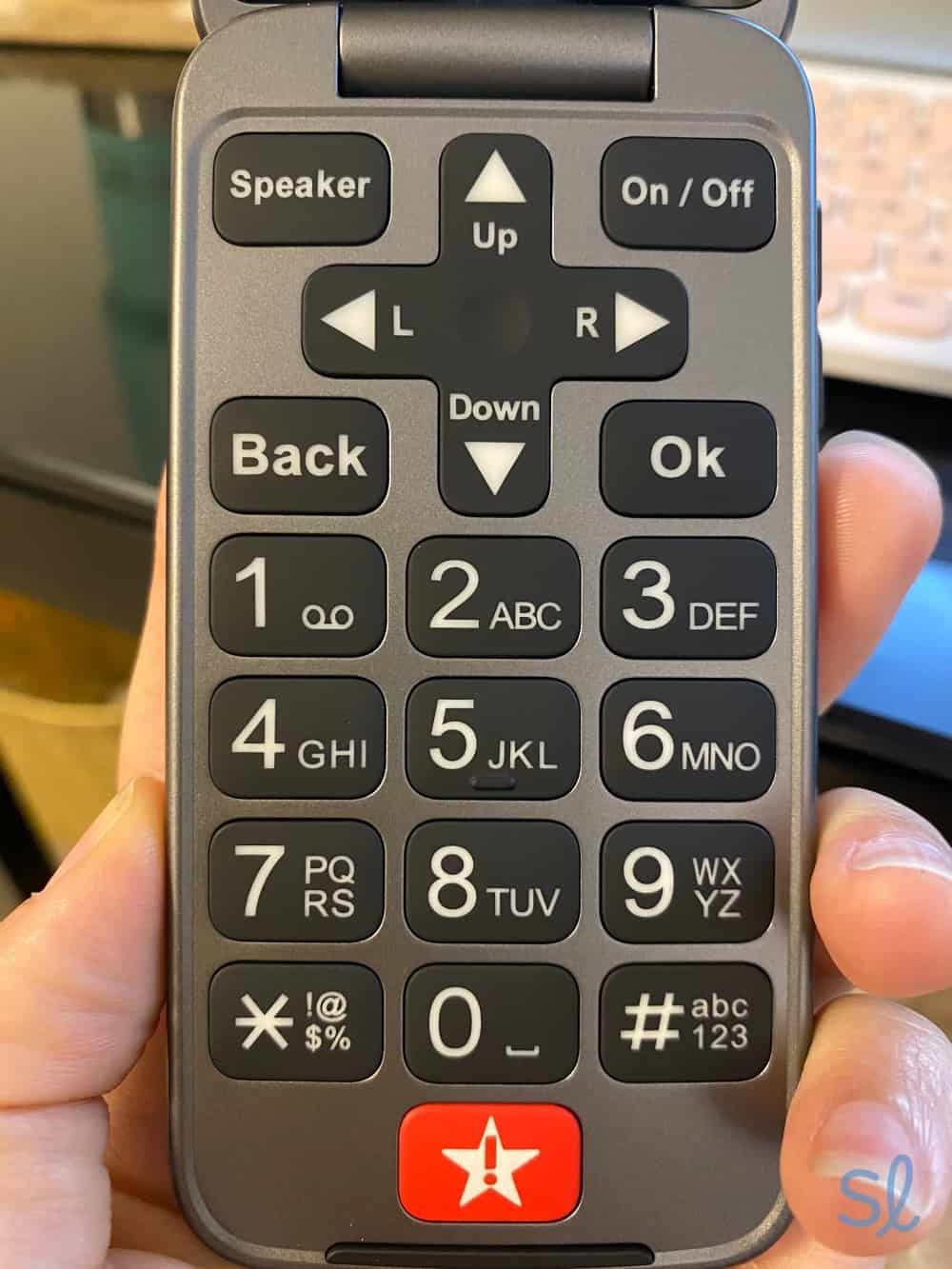
Lively's Urgent Response button is what makes it one of the best cell phones for seniors. Like the Jitterbug Smart4, I just pressed the red Urgent Response button on the keypad to connect with Lively's 24/7 monitoring center. This service is available only with Lively's top-tier plans, so consider that when budgeting. Unlike the Jitterbug Smart4, the Flip2 doesn't connect to the internet, so it's best for seniors who don't plan to surf the web.
I monitored the phone via the Lively Link app, which shows user location, battery level, and emergency call history. This gave me peace of mind knowing I could locate my loved one if they became lost, disoriented, or wandered off. These features are available only with a Preferred plan ($39.99 a month) or Premium plan ($49.99 a month).
The Lively Flip keypad and Urgent Response button
I also like the Jitterbug Flip2's Amazon Alexa feature. Alexa cannot call 911 directly, but the voice assistant can put you in touch with someone who can. When my grandma tested the assistant, it connected her to me so I could help. This is a great addition if you don't want to spend extra money on one of the higher-tier plans. Amazon Alexa is also great for everyday tasks, such as composing texts or making calls.
Without a virtual assistant, the Flip2 makes it easy to contact favorite contacts via the one-touch speed dial function. Just keep in mind that you'll need to access your contacts first and assign a number to the contacts you want to add to your speed dial list. This may require help from a loved one.
» You Might Also Like: Jitterbug Phone Review
Battery Life
Like the Jitterbug Smart4, the Jitterbug Flip2 has an excellent battery that can last up to several days in standby mode. While using the phone, I found its battery lasted for about 12 hours after heavy use.
Savings Alert: The Jitterbug Flip2 and Jitterbug Smart4 ship free!
Camera Quality
The Jitterbug Flip2 has an 8 MP rear-facing camera, which is an upgrade from previous models. The Jitterbug Flip2 is lightweight and easy to grip, making it a breeze to snap pictures and videos. I took some photos inside and outside, and they turned out well.
Photo of my potted flowers taken with Lively's Jitterbug Flip2
-
3. RAZ Mobility - Simplest Cell Phone
See Pricing Links to RAZ MobilityWhat we like most
- Smartphone designed for those with dementia
- Built-in emergency button
- Large buttons and contact photos
RAZ MobilitySee Pricing Links to RAZ MobilityOverview:
RAZ Memory Cell Phone
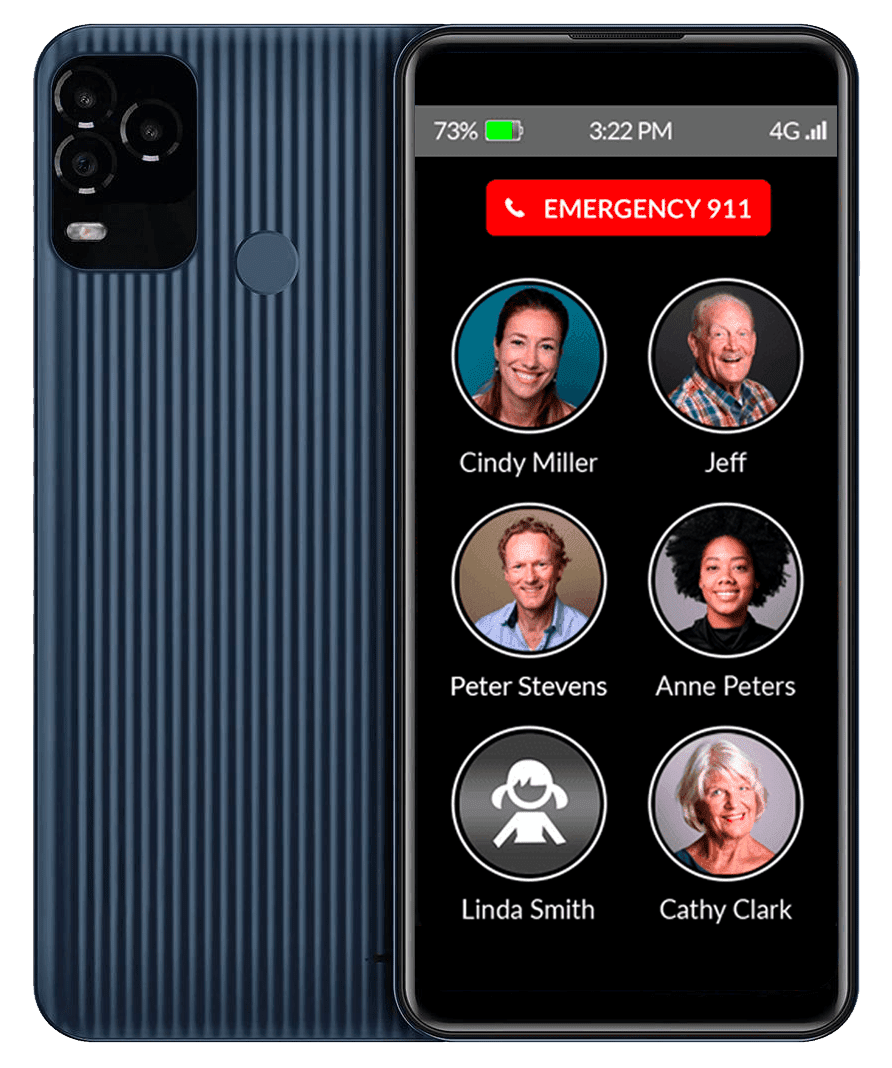
The RAZ Memory Cell Phone is simple, making it an excellent choice for those with dementia. Many phones on our list work well for seniors with dementia, but the RAZ Memory Cell Phone is specifically designed for this demographic. The RAZ Memory Cell Phone starts at $369.00, so make sure it fits your budget.
The phone has one screen featuring contacts and an emergency button to call 911. I added photos to each contact, which display next to the person's name on the large screen. This makes it easy for the user to identify whom they want to call, whether it's a caregiver, loved one, or emergency services. Press the picture of the person to call, and the phone connects.
The phone also has a Remote Manage feature that allows loved ones or caregivers to remotely manage the cell phone through a mobile app or online portal. This lets the user maintain independence, while caregivers ensure the user's safety.
» Useful Resource: Five Best Budgeting Apps for Seniors
Pros & Cons:Pros About RAZ Mobility
- Simple, one-screen design
- Large contact photos
- Emergency help button
- Remote Manage feature for caregivers
- Very long battery life
- Unlocked and compatible with most major carriers
- Location tracking
- Scam and robo calls can be eliminated
- Phone remains unlocked
- Caregiver app provides remote access and management from afar
Cons About RAZ Mobility
- No additional features, such as text messaging or internet access
- Can save a maximum of 30 standard contacts (plus emergency contacts)
Our Hands-on Experience:Health and Safety Features
The main safety feature of the RAZ Memory Cell Phone is the emergency help button, which calls 911 directly. Or you can change the settings so the help button calls RAZ emergency services.
A trained agent who knows the user has memory loss will answer the call and notify the user's emergency contacts. This is a great option for those with memory loss who make frequent unnecessary 911 calls. I appreciate that RAZ has options like this!
With the Remote Manage feature, family members can remotely manage the phone's settings via a mobile app. I remotely added or deleted contacts, checked the phone's battery life, sent reminders, tracked the phone's location, and set specific hours when calls can be placed. This last feature is particularly useful for people with a loved one who struggles with sundowning or tends to feel most confused during certain times of day.
This phone is intentionally simple. That means no extra features, such as text messaging, internet access, mobile apps, or voicemail. That may be a drawback for some seniors, but those with dementia will likely welcome the simplicity.
» Helpful Resource: Alzheimer’s Association Helpline
Battery Life
The RAZ Memory Cell Phone has a long-lasting battery for seniors who may forget to charge their phone from time to time. It can last up to several days in standby mode, which is better than the Jitterbug Flip2 or Smart4. It's also designed to last with heavy use, partly because there aren't many things you can do with the phone.
I tested the battery life by making several calls throughout the day. I didn't receive a low-battery notification until late in the evening! When the phone hit 20 percent battery life, it automatically sent a text alert to my contacts. I'm a big fan of this feature because it allows loved ones to check in and remind the user to charge the phone if they forget.
Camera Quality
One of the biggest drawbacks of the RAZ Memory Cell Phone is that it can't take photos. It doesn't have a camera. For $349, I'd prefer not only a camera, but one that takes quality photos. A camera may not be important for some seniors, but taking and sending photos or videos via text or email is a great way to stay in touch with loved ones. If a camera is essential and you want a phone with long battery life, the TCL Classic may be a better option.
-
4. TCL Classic from AT&T - Most Affordable
 See Pricing Links to Att-promotions.com
What we like most
- Inexpensive flip phone
- Simple design
- Internet access
TCL Classic from AT&TSee Pricing Links to Att-promotions.comOverview:
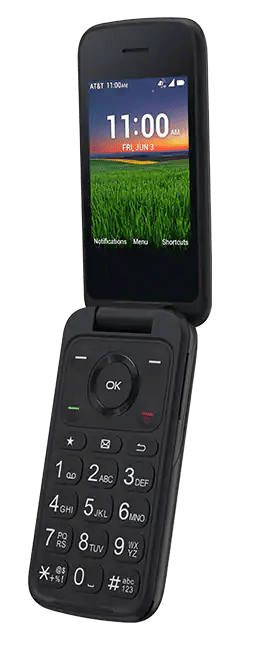
TCL Classic
Priced at $74.99, the TCL Classic made our list thanks to its affordable price. To keep things simple without busting your budget, the TCL Classic is a great option. I found the phone simple to use, featuring an intuitive interface and dual displays. I easily navigated the keyboard with large, clearly labeled buttons. The TCL Classic also has shortcuts to your email, a web browser, and other useful features.
I appreciate that the phone has internet access, because many other flip phones, including the Jitterbug Flip2, don't. This allows users to browse the internet, stay connected through social media, and use GPS navigation if they get lost. The phone's internet speeds are slow, though. If a slow connection bothers you, consider a different phone.
Quick Tip: Visit our list of this year's best senior cell phone plans to compare top carriers.
This phone comes with all the basics, including talk, text, internet access, and a camera. The TCL Classic isn't exclusive to AT&T, but an AT&T plan is a great option for seniors. AT&T's 55+ plan offers unlimited talk, text, and data starting at $60 per month, or $55 per line for two lines.
» Further Reading: AT&T Unlimited 55+ Plan Review
Pros & Cons:Pros About TCL Classic from AT&T
- Inexpensive flip phone
- Intuitive navigation
- Bluetooth compatibility
- Internet access
- Hearing aid compatibility
Cons About TCL Classic from AT&T
- No medical alert features
- The browser isn’t the best
- Low camera quality
Our Hands-on Experience:Health and Safety Features
Given the affordable price point, it's understandable that the TCL Classic doesn't include many advanced health and safety features. It's easy to use, compatible with most hearing aids, and makes it easy to set alarms and personal reminders.
These features are more basic compared to the Jitterbug Flip2 or Smart4 with Lively's Premium plan. I would have liked a button to access emergency contacts, or even a voice assistant. Given the low price point, however, I can't complain about the lack of features.
Battery Life
I tested the battery and found it lasts for about 10 hours of talk time and 15 days in standby mode. This gives seniors more standby battery life than the Jitterbug Flip2 or Smart4. Like the RAZ Memory Cell Phone, the TCL Classic's lack of features helps boost battery life, but the TCL Classic lets you text and browse the internet (though the slow internet is disappointing).
Camera Quality
Like the TCL FLIP Go, the TCL Classic has a 2 MP rear-facing camera that delivers subpar results. After taking some photos, I felt the image quality varied by environment. In a well-lit area, I could make out details. If the lighting was less than perfect, the image was blurry or grainy. If you're more concerned about staying connected than taking photos, this won't be a major concern.
-
5. Snapfon ez4G - Best Brick-Style Phone

What we like most
- Medical alert features
- Affordable phone
- Simple design
Overview:
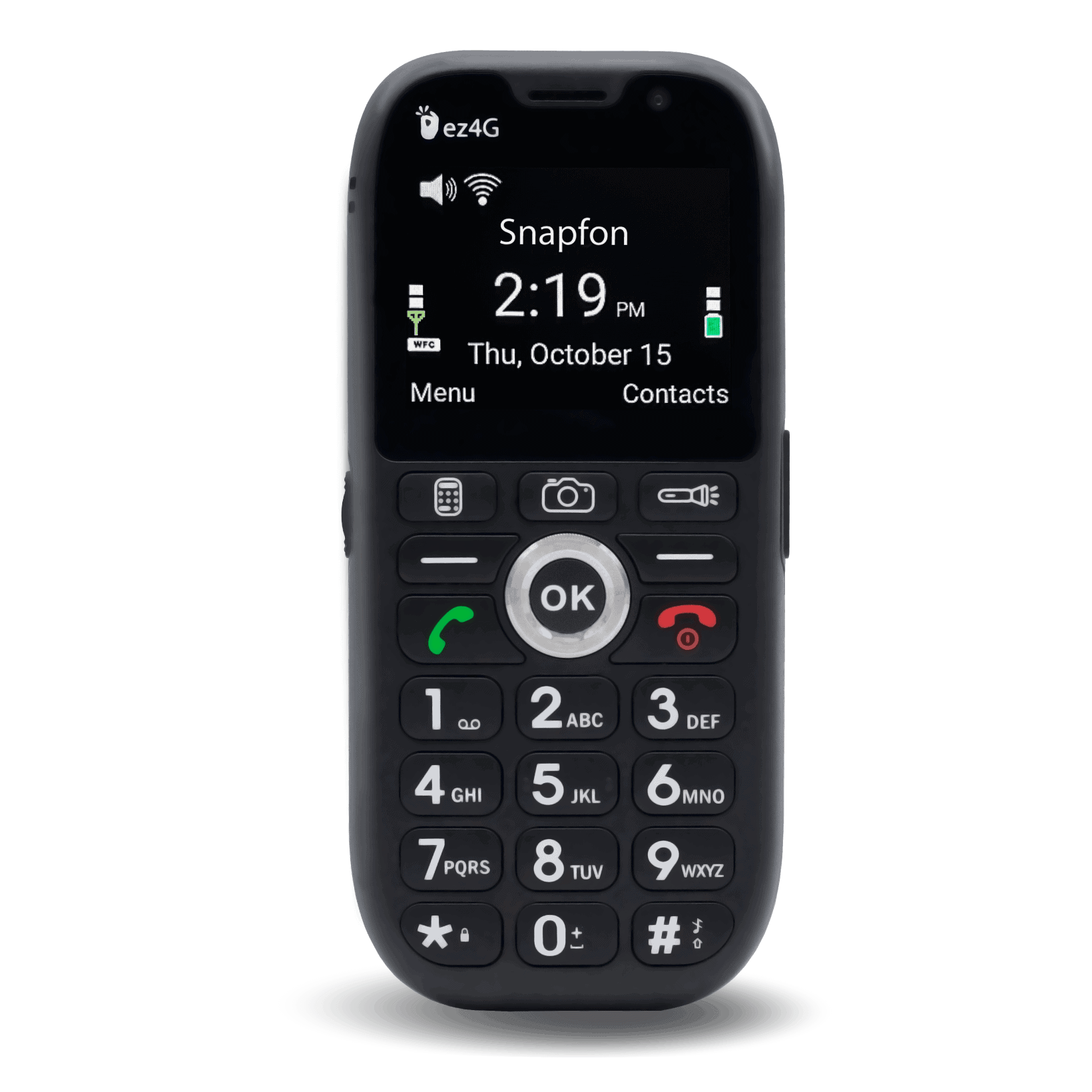
Snapfon ez4G
One of my favorite things about the ez4G is the balance it strikes between simplicity and connectivity. It's a basic brick-style phone, making it easy to use, but it has internet browsing, 4G LTE speeds, hotspot capability, and GPS tracking. All for around $60. Not bad.
Emergency features, such as an SOS button, speed dialing, and preprogrammable text messages, make it easy for seniors to get help or stay in touch. The Snapfon ez4G comes with fall detection and a siren. These can be lifesaving in an emergency and are rare for a cell phone.
Pros & Cons:Pros About Snapfon ez4G
- Fall detection and siren
- SOS button
- Speed dialing and preprogrammable SMS
- Simple flip design with big buttons
- Wi-Fi calling
Cons About Snapfon ez4G
- Smaller screen and text
- Can only be used with a Snapfon service plan
- Extra cost for monitoring service
Our Hands-on Experience:Health and Safety Features
The Snapfon ez4G has great features for seniors with dementia. The fall detection and siren are lifesavers, especially since people with dementia are at a higher risk of falls.
The SOS button makes it easier to contact loved ones and emergency responders without dialing 911. The SOS button is on the back of the phone, just under the camera. During testing, I liked the placement. It was easy to access, but I wasn't likely to accidentally press it.
One drawback is that the SOS button contacts emergency agents only if you upgrade to sosPLUS, which costs $40 per month. I tested the service and connected with an agent in under 30 seconds. I also simulated falls onto couch cushions and found the phone accurately detected a fall about 80 percent of the time.
» Useful Guide: Best Medical Alert Systems With Fall Detection
How do Snapfon's medical alert features compare to Lively's? Lively phones don't offer fall detection, so Snapfon has a leg up here. Snapfon doesn't have many other health and safety features that Lively offers, such as a care advocate and 24/7 access to an on-call nurse. I'd recommend Snapfon if fall detection is your main concern, but Lively is my top pick for more extensive features.
I like the Snapfon ez4G for many reasons, but I wish it had a bigger screen. Text may be difficult to read for seniors with impaired vision. I also wasn't thrilled with Snapfon's separate monitoring service billing. Emergency monitoring may be non-negotiable for older folks with dementia, and that $40 per month for sosPLUS adds up quickly.
» Compare Your Options: Lively vs. Snapfon
Battery Life
Snapfon advertises an average talk time of five hours and a standby battery life of 4.5 days. I found the talk-time average accurate, but it's underwhelming compared to most other phones on our list, including the TCL Classic.
In my experience, the standby battery life lasted for about three days on a single charge. That may be because I received texts and notifications regularly, but it was still disappointing. Despite the mediocre battery life, the Snapfon ez4G has enough power to last a day or two on a single charge with light use.
Camera Quality
The Snapfon ez4G features a 2 MP front-facing camera and a 5 MP rear camera. The camera is decent for snapping photos and videos, but less impressive for selfies. I took some clear pictures with the regular camera, but selfies were low quality. Still, it's an improvement on the TCL Classic, which has just one 2 MP camera. For a better camera, I'd recommend the Jitterbug Smart4.

Common Issues Faced by Seniors With Dementia
Seniors with dementia face obstacles that make phone usage and ownership more challenging. Everyone misplaces their phone from time to time, but losing a phone is more common among people with dementia. Replacing an inexpensive phone may not be a big deal, but the cost can add up if someone with dementia regularly loses phones. That's why low-cost phones with location-tracking features are most beneficial.
Repeating mistakes is also common for seniors with dementia. Even someone with mild dementia may have difficulty contacting the right person or avoiding spam calls, so many dementia-friendly phones allow only a small number of contacts, give a trusted relative remote management of settings, and limit internet access.
It's important to consider the physical and psychological well-being of a senior with dementia. Feeling foggy or getting lost could be a daily occurrence, and having a phone that makes it easy to detect a fall, share the user's location, and contact family or emergency services with one button can make life easier and safer for older adults with dementia.
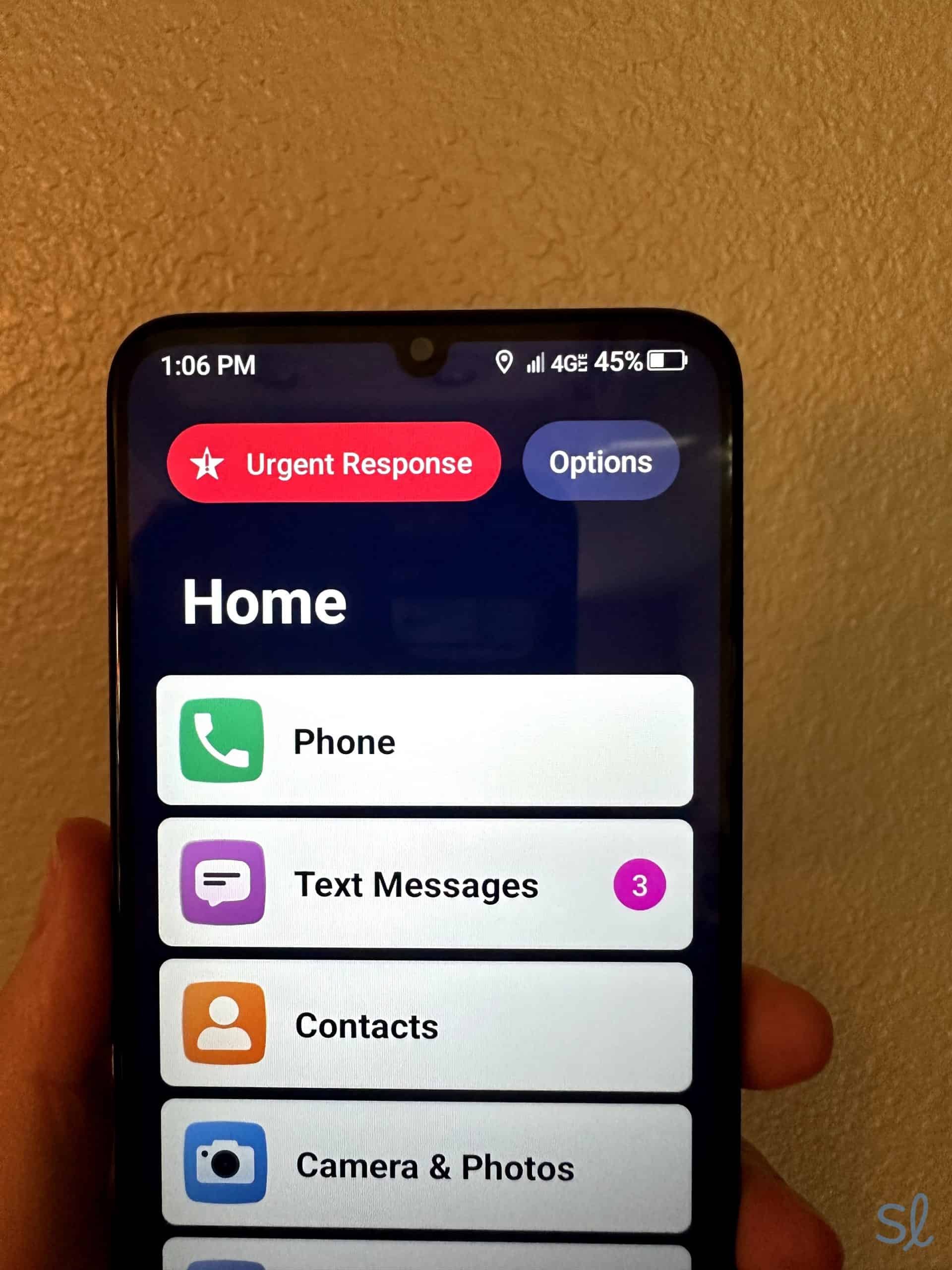
Lively's Urgent Response button is clearly displayed on the home and lock screen
Do Seniors With Dementia Need a Cell Phone?
Depending on the stage of their illness, seniors with memory loss can benefit from a cell phone for several reasons. Having a mobile phone gives older folks with memory challenges more independence. They can call for help during an emergency or a foggy moment. Older adults with dementia can also use GPS navigation to find their way home if they wander.
Cell phones make it easier for loved ones to stay in touch. This is the best reason for older adults with memory loss to have a phone, even if they don't plan to use many features. Research shows that maintaining social connections significantly protects against cognitive decline and depression in older adults2.
» Learn More: Statistics About Seniors
With GPS tracking, family members and caregivers can locate loved ones quickly if they go missing or get lost. Many cell phones for seniors also come with medical alert or emergency response features — and for good reason. Data confirms that individuals with cognitive impairment fall nearly twice as often annually as those without, making monitoring features like SOS buttons and fall detection essential.3
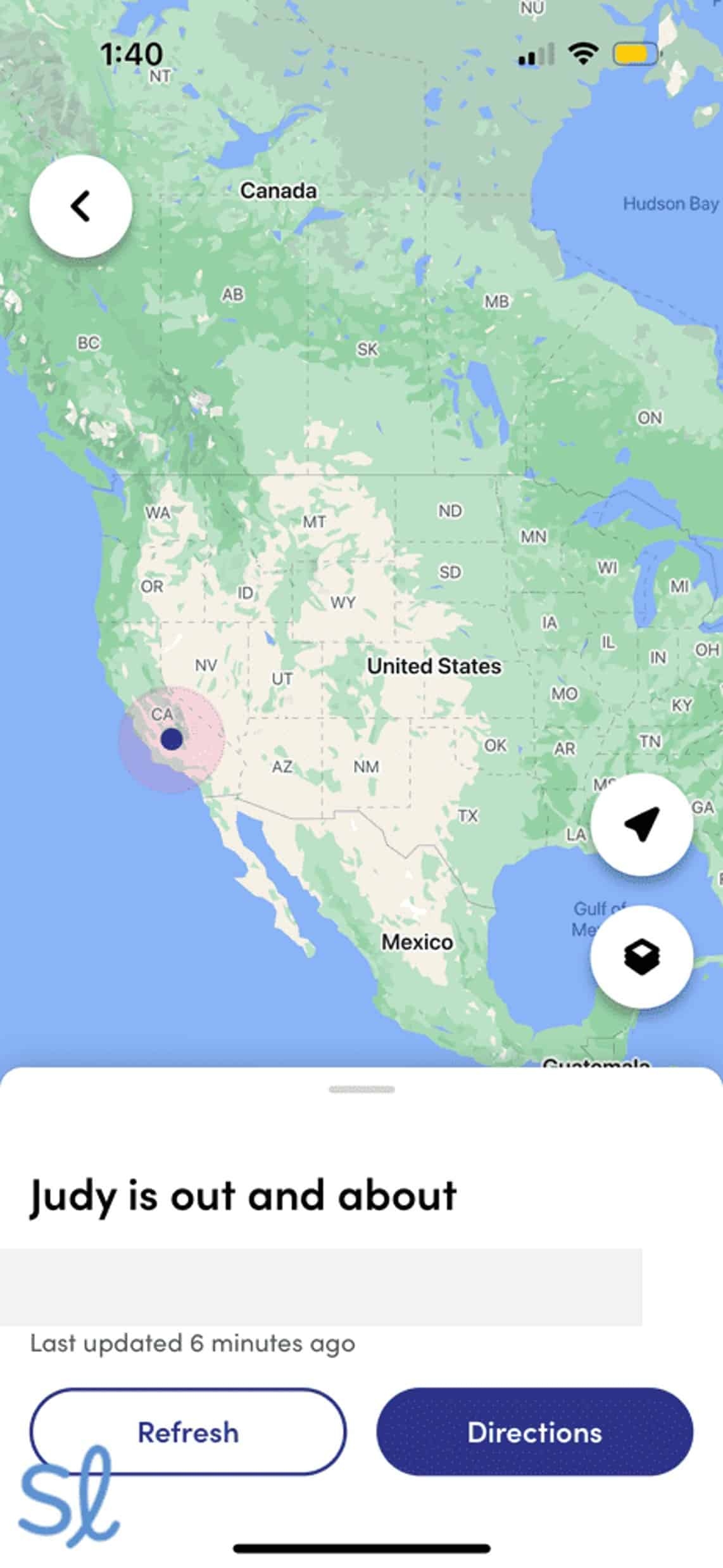
Many cell phones for those with dementia, including the Jitterbug Smart4, offer GPS tracking features for family members and caregivers
What to Consider When Shopping for a Dementia-Friendly Cell Phone
Just because a phone is senior-friendly doesn't mean it will be the right choice for an older adult with dementia. Here are key considerations when choosing a dementia-friendly cell phone:
- Stage of dementia: Dementia is a degenerative disorder that generally worsens with time. Seniors with mild or early-stage dementia may feel comfortable navigating a smartphone, while seniors with advanced dementia may need a basic cell phone for emergencies.
- Caregiver presence: The availability of caregivers is important when purchasing a cell phone for someone with dementia. If a dependable caregiver can provide ongoing support, choose a phone that lets caregivers control settings, contacts, and phone usage.
- Budget: The cost of a cell phone for seniors with dementia can be a double-edged sword. You may want to spend more for a phone with dementia-friendly features. If your loved one loses phones frequently, you may prefer a cheaper option. Consider your long-term phone budget before purchasing.
- Emergency service features: Every phone can dial 911, but that may not be enough for seniors with dementia. Look for features like an SOS button, fall detection, and 24/7 emergency monitoring services. Falls are particularly common among older adults with dementia, with studies showing approximately 80 percent experience at least one fall annually, which is roughly three times the rate of older adults without cognitive impairment. If your loved one dials 911 frequently or unnecessarily, consider features that reroute 911 calls to a trained agent who knows your loved one has dementia and can evaluate the situation accordingly.
FYI: If you’re looking for a phone on a tight budget, check out our guide to the best cheap cell phones for seniors!
More Cell Phone Resources for Seniors
Looking for a certain type of cell phone or want to compare options? Check out our resources below. We've tested, compared, and ranked cell phones for a variety of needs.
- Best Flip Phones for Seniors
- Best Free Phones for Seniors
- Best iPhones for Seniors
- Best Android Phones for Seniors
- Best Big-Button Cell Phones for Seniors
- Best Samsung Phones for Seniors
- Best Voice-Activated Cell Phones for Seniors
- Best Unlocked Phones for Seniors
- Best VoIP Phones for Seniors
- Best 5G Phones for Seniors
Frequently Asked Questions About Cell Phones for Seniors With Dementia
-
Can seniors with dementia use a cell phone?
Yes. Seniors with dementia can learn to use a cell phone with practice, but the device has to be easy to use. Caregivers should put privacy settings in place to protect against common senior fraud, such as spam emails, fake websites, and robocalls.
-
How much do cell phones for seniors with dementia cost?
Based on our research, a quality phone with features to keep seniors with memory loss safe ranges from $60 to $400.
-
Do the cell phones on this list require a contract?
Many of these phones are available through cellular carriers, but we chose models without contracts for flexibility.
-
Should seniors with dementia have internet access on their phones?
Absolutely. Even if they’ve reached a stage where they can’t browse independently, caregivers and loved ones can help them access emails, photos, and videos from family members.
-
What is the best mobile phone for someone with dementia?
The Jitterbug Smart4 is the best mobile phone for seniors with dementia. It offers simple list-style menus, basic smartphone features, and medical alert features with Lively’s top-tier plans.
-
Drexel News. (2023). Fall Rate Nearly 50% Among Older Americans with Dementia.
-
National Institute on Aging. (2019). Social Isolation, Loneliness in Older People Pose Health Risks.
-
National Library of Medicine. (2024). Meta-Analysis-Based Comparison of Annual Fall Risk between Older Adults with Alzheimer’s Disease and Mild Cognitive Impairment.